
Overview
The General Collaborator role lets you give users access to support and work a lead without assigning them as the Buyer or Listing Agent. This is ideal for ISAs, assistants, transaction coordinators, or team members who need visibility and task access, but shouldn’t be tied to the lead as a primary role.
Table of Contents
Why This Feature Matters
This role helps teams stay organized, secure, and collaborative by:
-
Improving lead management — Add support users without giving them full manager permissions.
-
Enabling better collaboration — Allow ISAs or assistants to help with outreach, tasks, and follow-up.
-
Preserving visibility — Keep collaborators connected to leads even when those leads move between agents or into ponds.
-
Preventing role confusion — Avoid overusing Buyer or Listing Agent roles for people who aren’t responsible for the transaction.
What Is a General Collaborator?
A General Collaborator is a user who can view and work a lead, but is not considered the primary agent responsible for it.
If the collaborator is an Agent-level user, they can:
-
Send messages
-
Assign and complete tasks
-
Manage action plans
-
Update lead roles
-
Log notes and activities
They are meant to support, not replace, the primary agent role.
Notifications for Collaborators
Notifications in Sierra are tied to the Buyer or Listing Agent role on a lead, not to the General Collaborator role. This distinction explains what a collaborator can expect to be notified about, and what they won't be.
Being added as a collaborator doesn't trigger a notification. There's no system alert for this, whether the collaborator is added from a Lead Record, through Lead Routing, or by another agent.
Lead-activity notifications (e-alerts, saved listing requests, showing requests, and similar) are controlled by the assigned agent, not the collaborator. By default, only the agent's own contact info is set to receive these. A collaborator's own notification toggles don't affect this, since these notification types are configured at the lead/agent level, not the collaborator's profile. To get a collaborator included:
- The assigned agent goes into their own Notification Settings and adds the collaborator's email to each specific notification type they want the collaborator to see (for example, saved listing request or showing request scheduled).
- This has to be set up per notification type, not as a single blanket setting. Once it's added, the collaborator will start receiving that notification type going forward.
One notification type works differently: if a lead replies directly to a message the collaborator sent themselves, the collaborator is notified of that specific reply without any extra setup.
What collaborators get without any setup:
-
A shared inbox feed. When the assigned agent sends a message to the lead, that conversation is said to appear in the collaborator's inbox too, so they can see and respond to it even without a direct notification.
-
A Smart Filter workaround. Since collaborators aren't notified when a lead is assigned to them, most teams set up a Smart Filter so collaborators can pull up their shared leads on demand rather than waiting on an alert. See Advanced Search and Smart Filters in the Leads Dashboard.
-
For teams that want broader visibility, some set up automations or tags to flag urgent lead activity for collaborators, or forward emails from the inbox so a collaborator's supporting agents automatically receive a copy. These are team-level workarounds rather than a built-in collaborator notification setting.
For the full list of notification types and how individual notification settings work, see Lead Notification Settings: Email, Text, and In-App.
How to Assign a General Collaborator
1. Assign from a Lead Record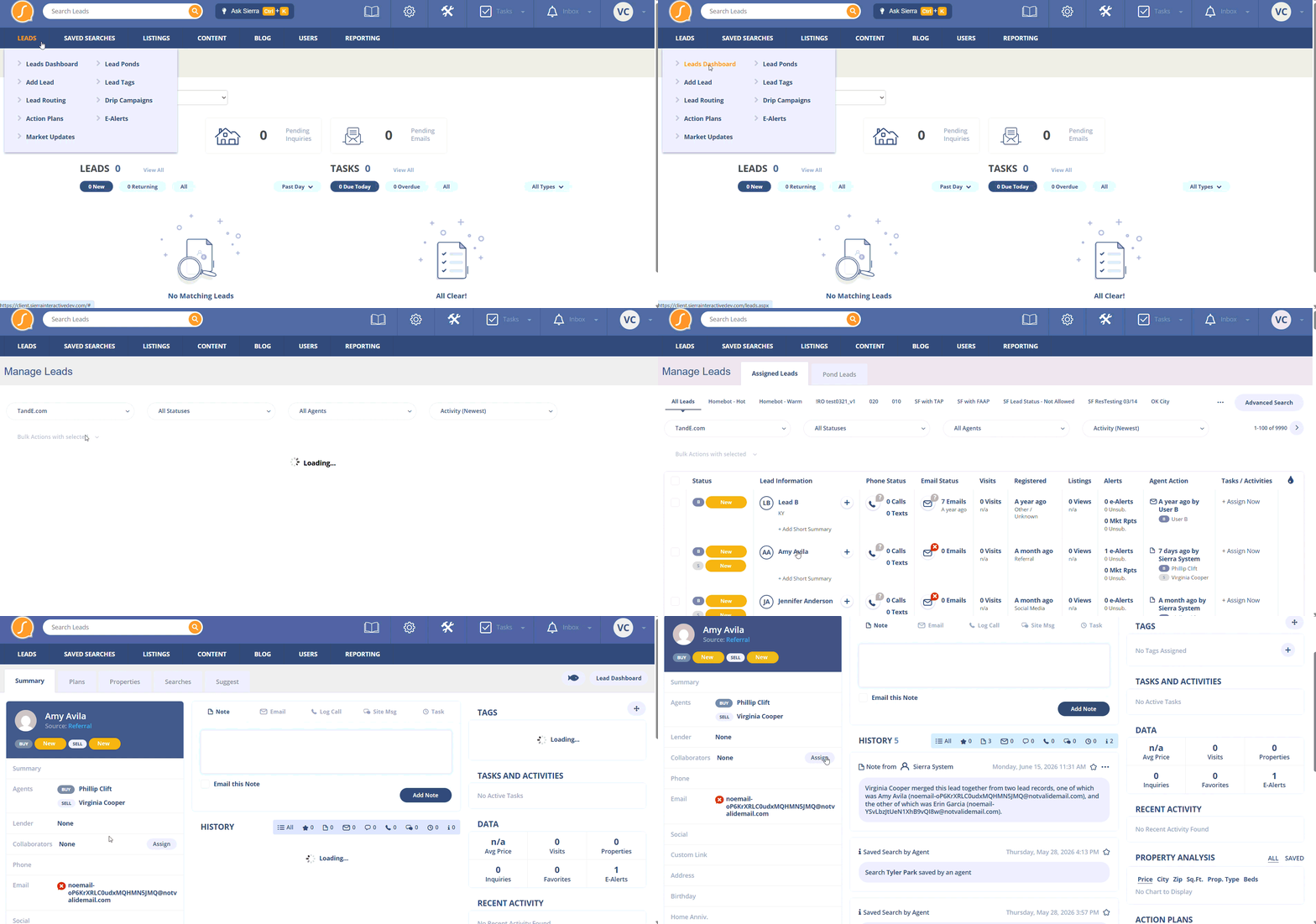
- Navigate to Leads>Leads Dashboard.
-
Open the lead and go to the Summary tab.
-
Find the Collaborators section.
-
Add or remove users as General Collaborators.
Permission required: Manager, Primary Manager, or Agent-level (if enabled in settings).
💡Important: You cannot add collaborators while a lead is in a pond.
To work around this:
-
Assign the lead to an agent.
-
Add collaborators.
-
Return the lead to the pond.
2. Enable Agent-Level Assignment (Optional)
To allow agents (not just managers) to assign collaborators: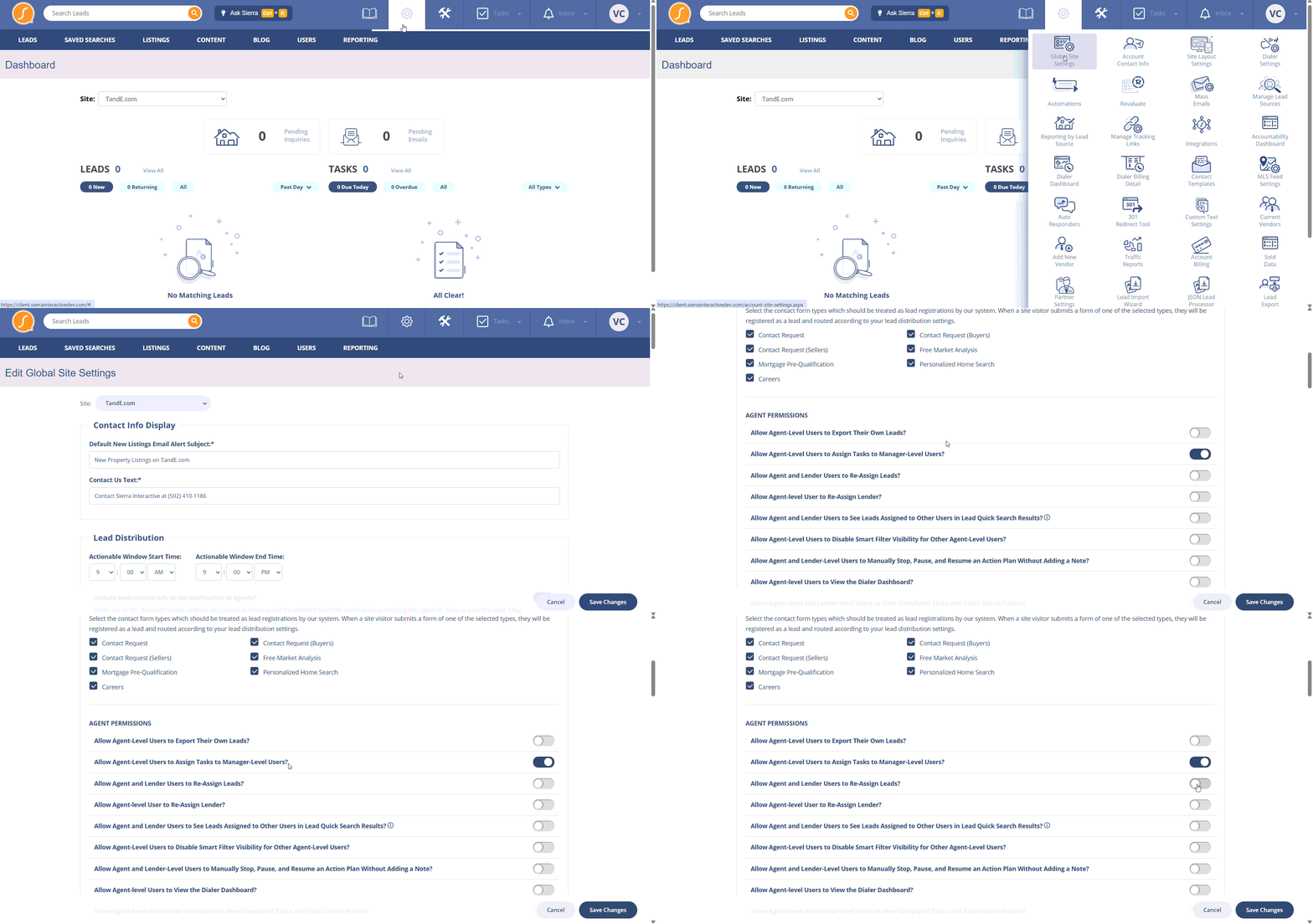
-
Navigate to the Gear Icon.
-
Go to Global Site Settings.
-
Enable “Allow Agent and Lender Users to Reassign Leads?”
Once enabled, agents can add or remove collaborators on their own leads.
3. Assign via Lead Routing
You can automatically add collaborators when a lead is created.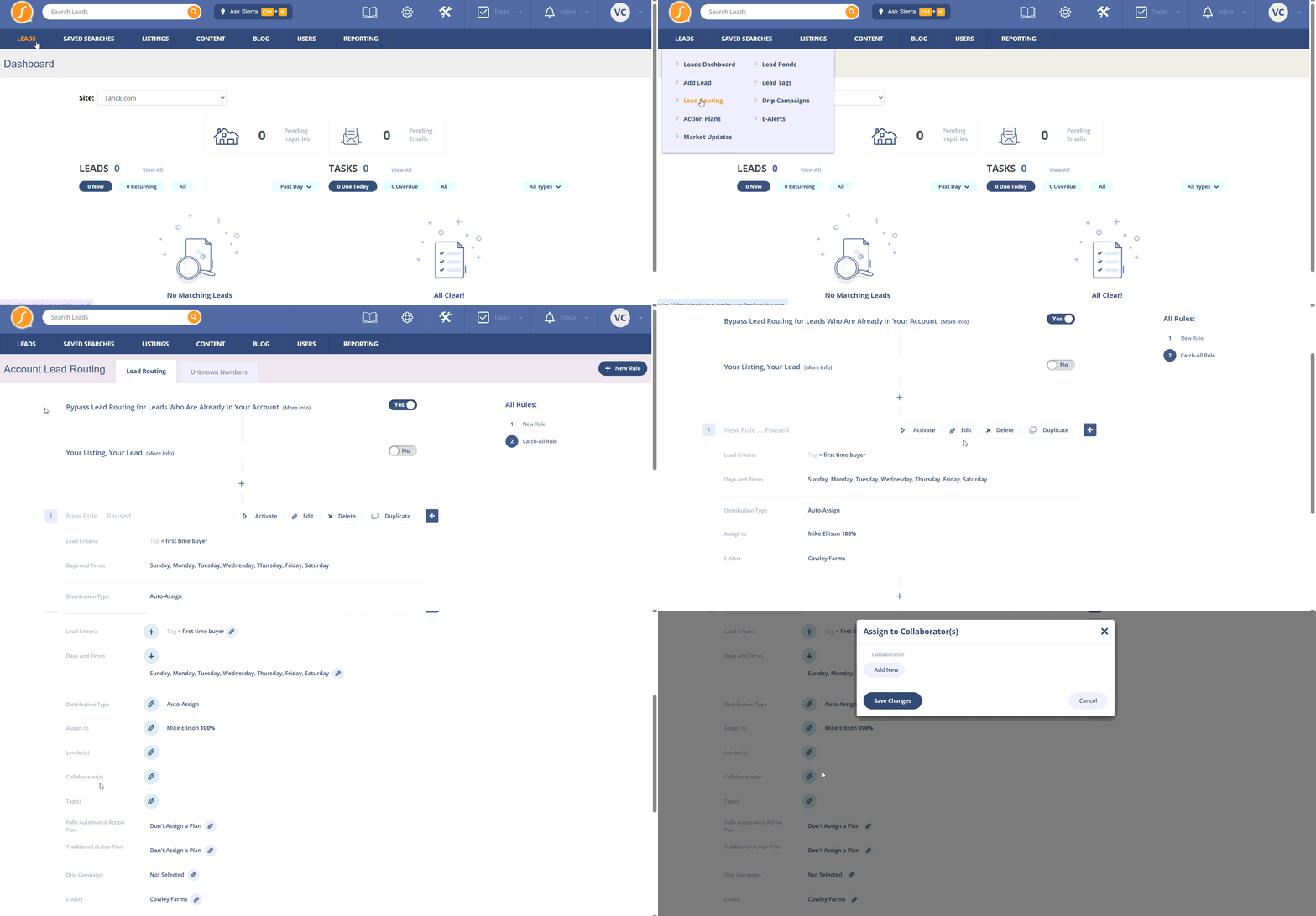
-
Navigate to Leads>Lead Routing.
-
Go to Lead Routing Rules and edit the existing rule.
-
Add one or more users as General Collaborators.
If a user is also assigned as a Buyer or Listing Agent, they will not be added as a collaborator. Sierra will log a system note explaining why.
Best Practices
-
Use collaborators for support roles like ISAs, assistants, and coordinators.
-
Keep Buyer and Listing Agent roles reserved for the agents responsible for the transaction.
-
Plan around ponds — collaborators travel with the lead, but must be added before it enters a pond.
-
Leverage routing rules to scale your support structure automatically.
Troubleshooting Common Issues
-
I can’t add a collaborator to a pond lead.
Temporarily assign the lead to an agent, add collaborators, then return it to the pond. -
A user wasn’t added as a collaborator from a routing rule.
If they were also assigned as Buyer or Listing Agent, Sierra will skip adding them as a collaborator. This is expected behavior.
FAQs
-
What can a General Collaborator do?
If they are an Agent-level user, they can perform most standard agent actions: messaging, tasks, action plans, and updating roles. -
Can a collaborator see leads in a pond?
Only if they were assigned before the lead was moved into the pond. -
Can agents assign collaborators?
Yes, if “Allow Agent and Lender Users to Reassign Leads?” is enabled in Global Site Settings. - Will I be notified when I'm added as a collaborator on a lead?
No. There's no system notification for being added as a collaborator. Use a Smart Filter to check which leads you've been added to. - Why don't I get notified when a lead I'm collaborating on responds by text or email?
Those notification types are tied to the assigned Buyer or Listing Agent role, not the collaborator role. You'll see the conversation in your shared inbox, but you won't get a direct alert unless the assigned agent sets up notifications to contact other users for that lead.