---
title: Creating and Reusing Shared HTML Widgets Across Your Website
description: Learn how to create and manage Shared HTML Widgets in Sierra Interactive using the HTML Source Editor and reuse them across your content pages.
image: https://www.sierrainteractive.com/wp-content/uploads/2022/07/Website-Preview-V2A.jpg
---
[Skip to content](https://help.sierrainteractive.com/helpcenter/creating-and-reusing-shared-html-widgets-across-your-website#main-content)
[Contact Support](https://help.sierrainteractive.com/helpcenter/kb-tickets/new?hsLang=en)
[](https://help.sierrainteractive.com/helpcenter?hsLang=en)
- [Sierra CRM Login](https://client.sierrainteractivedev.com/login.aspx?sn=sierrainteractive.com)
- [Sierra Support](https://share.hsforms.com/1-PkIvKPkRJ2Oe4iP28LPugcrxj0?__hstc=240356316.ca34a03f98730f420ad639300528f2a2.1764955183725.1783970890126.1783975123568.351&__hssc=240356316.31.1783975123568&__hsfp=3cbed2008eb4c720102b6f72b9dd6767)
- [Training & Learning](https://info.sierrainteractive.com/live-training-learning-opportunities)
Show submenu for Training & Learning
- [Sierra Academy](https://info.sierrainteractive.com/sierra-academy)
- [Live Training Sessions](https://help.sierrainteractive.com/helpcenter/join-live-training-sessions-explore-sierra-learning-resources)
Show submenu for Live Training Sessions
- [Tuesdays 11AM ET](https://us02web.zoom.us/j/81520282538)
- [Wednesdays 1:30PM ET](https://us02web.zoom.us/j/84246589732)
- [Fridays 3PM ET](https://us02web.zoom.us/j/86964951435)
- [Sierra YouTube Channel](https://www.youtube.com/@sierrainteractive/featured)
- [Sierra Facebook Mastermind](https://www.facebook.com/groups/sierrainteractive)
- [Referral Dashboard](https://www.sierrainteractive.com/customer-referral-dashboard/)
- [Operations & Closures](https://info.sierrainteractive.com/sierra-interactive-observed-holidays)
- [System Status](https://status.sierrainteractive.com/)
Open main navigation
Close main navigation
- [Sierra CRM Login](https://client.sierrainteractivedev.com/login.aspx?sn=sierrainteractive.com)
- [Sierra Support](https://share.hsforms.com/1-PkIvKPkRJ2Oe4iP28LPugcrxj0?__hstc=240356316.ca34a03f98730f420ad639300528f2a2.1764955183725.1783970890126.1783975123568.351&__hssc=240356316.31.1783975123568&__hsfp=3cbed2008eb4c720102b6f72b9dd6767)
- [Training & Learning](https://info.sierrainteractive.com/live-training-learning-opportunities)
Show submenu for Training & Learning
- [Sierra Academy](https://info.sierrainteractive.com/sierra-academy)
- [Live Training Sessions](https://help.sierrainteractive.com/helpcenter/join-live-training-sessions-explore-sierra-learning-resources)
Show submenu for Live Training Sessions
- [Tuesdays 11AM ET](https://us02web.zoom.us/j/81520282538)
- [Wednesdays 1:30PM ET](https://us02web.zoom.us/j/84246589732)
- [Fridays 3PM ET](https://us02web.zoom.us/j/86964951435)
- [Sierra YouTube Channel](https://www.youtube.com/@sierrainteractive/featured)
- [Sierra Facebook Mastermind](https://www.facebook.com/groups/sierrainteractive)
- [Referral Dashboard](https://www.sierrainteractive.com/customer-referral-dashboard/)
- [Operations & Closures](https://info.sierrainteractive.com/sierra-interactive-observed-holidays)
- [System Status](https://status.sierrainteractive.com/)
- [Contact Support](https://help.sierrainteractive.com/helpcenter/kb-tickets/new)
Search Help Center
- There are no suggestions because the search field is empty.
1. [Help Center](https://help.sierrainteractive.com/helpcenter?hsLang=en)
2. [Website Management](https://help.sierrainteractive.com/helpcenter/website-management?hsLang=en)
3. [Website Structure & Navigation](https://help.sierrainteractive.com/helpcenter/website-management?hsLang=en#website-structure-navigation)
September 17, 2026
# Creating and Reusing Shared HTML Widgets Across Your Website
## Learn how to create and manage Shared HTML Widgets in Sierra Interactive and reuse them across your content pages.
### Table of Contents
1. [Why This Feature Matters](https://help.sierrainteractive.com/helpcenter/creating-and-reusing-shared-html-widgets-across-your-website#why)
2. [Who Can Access Shared Widgets](https://help.sierrainteractive.com/helpcenter/creating-and-reusing-shared-html-widgets-across-your-website#who)
3. [How Shared Widgets Work](https://help.sierrainteractive.com/helpcenter/creating-and-reusing-shared-html-widgets-across-your-website#how)
4. [Important Considerations](https://help.sierrainteractive.com/helpcenter/creating-and-reusing-shared-html-widgets-across-your-website#important)
5. [Step-by-Step Instructions](https://help.sierrainteractive.com/helpcenter/creating-and-reusing-shared-html-widgets-across-your-website#step)
6. [Best Practices](https://help.sierrainteractive.com/helpcenter/creating-and-reusing-shared-html-widgets-across-your-website#best)
7. [Troubleshooting & Common Questions](https://help.sierrainteractive.com/helpcenter/creating-and-reusing-shared-html-widgets-across-your-website#faqs)
---
### [Why This Feature Matters](https://help.sierrainteractive.com/helpcenter/creating-and-reusing-shared-html-widgets-across-your-website#why)
Shared HTML Widgets allow you to create reusable content blocks using custom HTML code that can be inserted into multiple content pages across your website.
This is especially useful if you want to:
- Add custom embeds (forms, calendars, videos, maps, etc.)
- Maintain consistent calls-to-action across multiple pages
- Update one piece of code that automatically updates everywhere it is used
- Reuse advanced formatting or design elements
Instead of copying and pasting code into individual pages, Shared Widgets allow you to manage that content in one central location.
---
### Who Can Access Shared Widgets
To create or edit Shared HTML Widgets, you must:
- Log into the Sierra Client Admin Area (CAA)
- Have appropriate content editing permissions
If you do not see the Shared Widgets option, your user role may not have access.
[back to the top](https://help.sierrainteractive.com/helpcenter/creating-and-reusing-shared-html-widgets-across-your-website#top)
---
### How Shared Widgets Work
Shared Widgets function as reusable content blocks:
- If you update the widget in the Shared Widgets area, the change will automatically apply everywhere the widget is used.
- You do not need to edit each individual page.
This makes it easy to maintain consistency across your site.
---
### Important Considerations
- Sierra does not create or modify custom HTML code on your behalf.
- Clients are responsible for ensuring that any third-party scripts or embedded tools comply with applicable privacy, tracking, and platform policies.
- Poorly formatted or incompatible HTML may affect how content renders on your site.
- Some third-party embeds may not function correctly if restricted by the provider.
If you are unsure about the functionality of a specific script, consult the provider of that tool.
[back to the top](https://help.sierrainteractive.com/helpcenter/creating-and-reusing-shared-html-widgets-across-your-website#top)
---
### Step-by-Step Instructions
#### Step 1: Access Shared Widgets
1. Log into your **Sierra Client Admin Area (CAA)**.
2. Select **Content** from the top navigation menu.
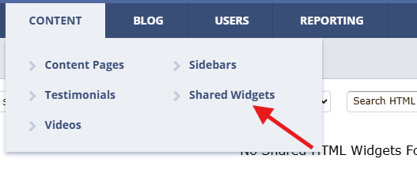
3. Choose **Shared Widgets** from the dropdown menu.
4. Click **Create New Shared Widget** in the top right corner.

#### Step 2: Create Your Widget
1. Enter a clear and descriptive Widget Name in the **Title field.**
2. On the widget creation screen, select the **widget type** as JavaScript/Style Code.
3. Paste your code into the Content area.
4. Click **Submit** to save your widget.
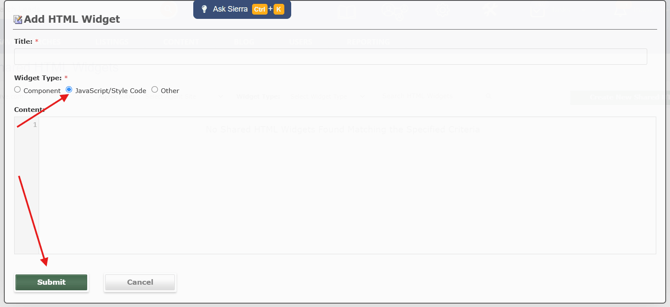
The widget is now available to insert into your content pages.
#### Step 3: Insert a Shared Widget into a Content Page
1. Navigate to the content page you want to edit.
2. Open the page in the Content Editor.
3. Select Add New Page Component.
4. Choose **Shared HTML** **Widget** as the component type. 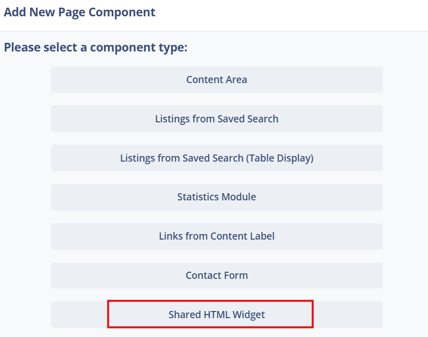
5. Select the Shared Widget you created, then click **Submit** to insert it. 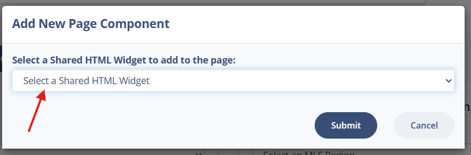
6. Save or publish the page.
Once inserted, the widget will display on the live page.
**Adding code directly to a page instead?** If you want to add HTML, CSS, or JavaScript to a single page without creating a reusable widget, skip the Shared Widget setup. Instead, add a new Page Component, choose **Content Area** (instead of Shared HTML), and paste your source code there. This adds the code to that one page only and won't update anywhere else.
[back to the top](https://help.sierrainteractive.com/helpcenter/creating-and-reusing-shared-html-widgets-across-your-website#top)
---
### Best Practices
- Use clear naming conventions so you can easily identify your widgets later.
- Test custom HTML code in a staging or draft page before widespread use.
- Keep custom scripts organized and documented internally.
- Use Shared Widgets for content that appears on multiple pages.
- Avoid inserting overly complex scripts unless necessary.
[back to the top](https://help.sierrainteractive.com/helpcenter/creating-and-reusing-shared-html-widgets-across-your-website#top)
---
### Troubleshooting & Common FAQs
#### Troubleshooting Common Issues
**My widget is not displaying correctly**
- Confirm the HTML code is valid.
- Check for missing closing tags.
- Verify that the third-party embed is active.
**My update did not reflect on all pages**
- Confirm you saved changes in the Shared Widgets section.
- Clear your browser cache and refresh the page.
**I do not see the Shared Widgets option →** Confirm you are logged in with a user role that includes content editing permissions.
#### FAQs
**Does Sierra offer website customization services?**
Improve your site’s performance, engagement, and user experience with a wide range of [website customization options](https://help.sierrainteractive.com/helpcenter/customize-your-sierra-website-to-boost-branding-and-conversion?hsLang=en). Sierra’s in-house team performs all work, billing hourly with a one-hour minimum.
- **Can I use JavaScript inside a Shared Widget?**You may add custom code using the HTML Source Editor. However, functionality depends on compatibility and third-party provider policies.
- **Will updating a widget automatically update all pages?**Yes. Any changes made to a Shared Widget will update wherever that widget is used.
- **Can Sierra troubleshoot custom HTML code?**Sierra can assist with general platform questions but does not provide development support for custom-coded scripts.
- **Can I delete a Shared Widget?**Yes. However, removing a widget will remove it from all pages where it is currently used.
- **Can I use an iframe to embed a widget from a third-party tool?**
iFrame embeds may work in some contexts, but are not guaranteed to render on all page types. Blog posts and certain content page layouts may strip iframe tags. If your embed isn't displaying, test it on a standalone content page and verify that the third-party provider allows iframe embedding.
- **What's the difference between a Shared Widget and adding code directly to a page?**
A Shared Widget is reusable, one update applies everywhere it's inserted. Adding code directly to a page (via a Content Area component) only affects that single page and must be updated manually wherever else it's used.
[back to the top](https://help.sierrainteractive.com/helpcenter/creating-and-reusing-shared-html-widgets-across-your-website#top)
- [Getting Started with Sierra](https://help.sierrainteractive.com/helpcenter/getting-started-with-sierra?hsLang=en#main-content)
- [Orientation & Approvals](https://help.sierrainteractive.com/helpcenter/getting-started-with-sierra?hsLang=en#orientation-approvals)
- [Activate Your Sierra Dialer](https://help.sierrainteractive.com/helpcenter/getting-started-with-sierra?hsLang=en#activate-your-sierra-dialer)
- [CRM Setup](https://help.sierrainteractive.com/helpcenter/getting-started-with-sierra?hsLang=en#crm-setup)
- [Connect Your Data](https://help.sierrainteractive.com/helpcenter/getting-started-with-sierra?hsLang=en#connect-your-data)
- [Launch Your Website](https://help.sierrainteractive.com/helpcenter/getting-started-with-sierra?hsLang=en#launch-your-website)
- [Start Working with Leads](https://help.sierrainteractive.com/helpcenter/getting-started-with-sierra?hsLang=en#start-working-with-leads)
- [Enhance Your Site](https://help.sierrainteractive.com/helpcenter/getting-started-with-sierra?hsLang=en#enhance-your-site)
- [Video Resource Library](https://help.sierrainteractive.com/helpcenter/video-resource-library?hsLang=en#main-content)
- [Webinar Recordings](https://help.sierrainteractive.com/helpcenter/video-resource-library?hsLang=en#webinar-recordings)
- [Video FAQ](https://help.sierrainteractive.com/helpcenter/video-resource-library?hsLang=en#video-faq)
- [IntelliSearch](https://help.sierrainteractive.com/helpcenter/video-resource-library?hsLang=en#intellisearch)
- [Lead Generation & Capture](https://help.sierrainteractive.com/helpcenter/lead-generation-capture?hsLang=en#main-content)
- [Sierra Digital Marketing Services](https://help.sierrainteractive.com/helpcenter/lead-generation-capture?hsLang=en#sierra-digital-marketing-services)
- [Lead Tracking](https://help.sierrainteractive.com/helpcenter/lead-generation-capture?hsLang=en#lead-tracking)
- [Saved Searches & IDX Settings](https://help.sierrainteractive.com/helpcenter/lead-generation-capture?hsLang=en#saved-searches-idx-settings)
- [Email Marketing & Automation](https://help.sierrainteractive.com/helpcenter/lead-generation-capture?hsLang=en#email-marketing-automation)
- [Lead Capture Tools](https://help.sierrainteractive.com/helpcenter/lead-generation-capture?hsLang=en#lead-capture-tools)
- [IntelliSearch](https://help.sierrainteractive.com/helpcenter/lead-generation-capture?hsLang=en#intellisearch)
- [Lead Engagement & Nurturing](https://help.sierrainteractive.com/helpcenter/lead-engagement-nurturing?hsLang=en#main-content)
- [AI-Assisted Lead Engage](https://help.sierrainteractive.com/helpcenter/lead-engagement-nurturing?hsLang=en#ai-assisted-lead-engage)
- [E-Alerts & Market Updates](https://help.sierrainteractive.com/helpcenter/lead-engagement-nurturing?hsLang=en#e-alerts-market-updates)
- [Sierra Success Hub](https://help.sierrainteractive.com/helpcenter/lead-engagement-nurturing?hsLang=en#sierra-success-hub)
- [Drip Campaigns](https://help.sierrainteractive.com/helpcenter/lead-engagement-nurturing?hsLang=en#drip-campaigns)
- [Action Plans & Automations](https://help.sierrainteractive.com/helpcenter/lead-engagement-nurturing?hsLang=en#action-plans-automations)
- [Buyer Lead Workflow](https://help.sierrainteractive.com/helpcenter/lead-engagement-nurturing?hsLang=en#buyer-lead-workflow)
- [Bulk Actions](https://help.sierrainteractive.com/helpcenter/lead-engagement-nurturing?hsLang=en#bulk-actions)
- [Lead Management](https://help.sierrainteractive.com/helpcenter/lead-management?hsLang=en#main-content)
- [Lead Organization & Tagging](https://help.sierrainteractive.com/helpcenter/lead-management?hsLang=en#lead-organization-tagging)
- [Reporting & Exports](https://help.sierrainteractive.com/helpcenter/lead-management?hsLang=en#reporting-exports)
- [Platform Tools](https://help.sierrainteractive.com/helpcenter/lead-management?hsLang=en#platform-tools)
- [Lead Routing & Permissions](https://help.sierrainteractive.com/helpcenter/lead-management?hsLang=en#lead-routing-permissions)
- [Calling & Dialer Tools](https://help.sierrainteractive.com/helpcenter/lead-management?hsLang=en#calling-dialer-tools)
- [Team Management & Accountability](https://help.sierrainteractive.com/helpcenter/lead-management?hsLang=en#team-management-accountability)
- [Website Management](https://help.sierrainteractive.com/helpcenter/website-management?hsLang=en#main-content)
- [Website Structure & Navigation](https://help.sierrainteractive.com/helpcenter/website-management?hsLang=en#website-structure-navigation)
- [AI Visibility & SEO](https://help.sierrainteractive.com/helpcenter/website-management?hsLang=en#ai-visibility-seo)
- [Website Pages & Content](https://help.sierrainteractive.com/helpcenter/website-management?hsLang=en#website-pages-content)
- [DNS, Branding, & User Experience](https://help.sierrainteractive.com/helpcenter/website-management?hsLang=en#dns-branding-user-experience)
- [Analytics](https://help.sierrainteractive.com/helpcenter/website-management?hsLang=en#analytics)
- [Support & Account Help](https://help.sierrainteractive.com/helpcenter/support-account-help?hsLang=en#main-content)
- [Contact Support](https://help.sierrainteractive.com/helpcenter/support-account-help?hsLang=en#contact-support)
- [Billing & Account Changes](https://help.sierrainteractive.com/helpcenter/support-account-help?hsLang=en#billing-account-changes)
- [Access & Permissions](https://help.sierrainteractive.com/helpcenter/support-account-help?hsLang=en#access-permissions)
- [Industry & MLS Compliance](https://help.sierrainteractive.com/helpcenter/industry-mls-compliance?hsLang=en#main-content)
- [NAR](https://help.sierrainteractive.com/helpcenter/industry-mls-compliance?hsLang=en#nar)
- [Compliance and Best Practices](https://help.sierrainteractive.com/helpcenter/industry-mls-compliance?hsLang=en#compliance-and-best-practices)
- [Integrations & API](https://help.sierrainteractive.com/helpcenter/integrations-api?hsLang=en#main-content)
- [Communication Integrations](https://help.sierrainteractive.com/helpcenter/integrations-api?hsLang=en#communication-integrations)
- [Marketing Integrations](https://help.sierrainteractive.com/helpcenter/integrations-api?hsLang=en#marketing-integrations)
- [CRM Integrations](https://help.sierrainteractive.com/helpcenter/integrations-api?hsLang=en#crm-integrations)
- [API & Developer Tools](https://help.sierrainteractive.com/helpcenter/integrations-api?hsLang=en#api-developer-tools)
- [Calendar & Appointments](https://help.sierrainteractive.com/helpcenter/integrations-api?hsLang=en#calendar-appointments)
[](https://help.sierrainteractive.com/helpcenter?hsLang=en)
1205 E Washington St #110, Louisville, KY 40206
Copyright © 2025, Sierra Interactive
```json
{
"@context" : "https://schema.org",
"@type" : "Article",
"author" : {
"@type" : "Organization",
"name" : "Sierra Interactive",
"url" : "https://help.sierrainteractive.com/helpcenter"
},
"datePublished" : "2026-02-19T12:00:00Z",
"description" : "Learn how to create and manage Shared HTML Widgets in Sierra Interactive using the HTML Source Editor and reuse them across your content pages.",
"headline" : "Using Shared HTML Widgets on Your Sierra Website",
"publisher" : {
"@type" : "Organization",
"logo" : {
"@type" : "ImageObject",
"url" : "https://help.sierrainteractive.com/hs-fs/hubfs/sierra%20interactive%20logo.png?width=250&height=34&name=sierra%20interactive%20logo.png"
},
"name" : "Sierra Interactive",
"url" : "https://help.sierrainteractive.com/helpcenter"
},
"subjectOf" : {
"@type" : "FAQPage",
"mainEntity" : [ {
"@type" : "Question",
"acceptedAnswer" : {
"@type" : "Answer",
"text" : "You may add custom code using the HTML Source Editor. However, functionality depends on compatibility and third-party provider policies."
},
"name" : "Can I use JavaScript inside a Shared Widget?"
}, {
"@type" : "Question",
"acceptedAnswer" : {
"@type" : "Answer",
"text" : "Yes. Any changes made to a Shared Widget will update wherever that widget is used."
},
"name" : "Will updating a widget automatically update all pages?"
}, {
"@type" : "Question",
"acceptedAnswer" : {
"@type" : "Answer",
"text" : "Sierra can assist with general platform questions but does not provide development support for custom-coded scripts."
},
"name" : "Can Sierra troubleshoot custom HTML code?"
}, {
"@type" : "Question",
"acceptedAnswer" : {
"@type" : "Answer",
"text" : "Yes. However, removing a widget will remove it from all pages where it is currently used."
},
"name" : "Can I delete a Shared Widget?"
}, {
"@type" : "Question",
"acceptedAnswer" : {
"@type" : "Answer",
"text" : "Improve your site’s performance, engagement, and user experience with a wide range of website customization options. Sierra’s in-house team performs all work, billing hourly with a one-hour minimum."
},
"name" : "Does Sierra offer website customization services?"
} ]
}
}
```
```json
{
"@context" : "https://schema.org",
"@type" : "HowTo",
"author" : {
"@type" : "Organization",
"name" : "Sierra Interactive",
"url" : "https://help.sierrainteractive.com/helpcenter"
},
"description" : "Learn how to create and manage Shared HTML Widgets in Sierra Interactive using the HTML Source Editor and reuse them across your content pages.",
"name" : "Step-by-Step Instructions",
"publisher" : {
"@type" : "Organization",
"logo" : {
"@type" : "ImageObject",
"url" : "https://help.sierrainteractive.com/hs-fs/hubfs/sierra%20interactive%20logo.png?width=250&height=34&name=sierra%20interactive%20logo.png"
},
"name" : "Sierra Interactive",
"url" : "https://help.sierrainteractive.com/helpcenter"
},
"step" : [ {
"@type" : "HowToStep",
"text" : "Step 1: Access Shared Widgets\nLog into your Sierra Client Admin Area (CAA).\nSelect Content from the top navigation menu.\nChoose Shared Widgets from the dropdown menu."
}, {
"@type" : "HowToStep",
"text" : "Step 2: Create Your Widget\nEnter a clear and descriptive Widget Name in the Title field.\nUse the HTML Source Editor to add your custom HTML code.\nSave your widget.\nThe widget is now available to insert into your content pages."
}, {
"@type" : "HowToStep",
"text" : "Step 3: Insert a Shared Widget into a Content Page\nNavigate to the content page you want to edit.\nOpen the page in the Content Editor.\nSelect Add New Page Component\nInsert the Shared Widget where desired.\nSave or publish the page."
} ]
}
```
```json
{
"@context" : "https://schema.org",
"@id" : "https://www.sierrainteractive.com/#organization",
"@type" : "Organization",
"alternateName" : "Sierra",
"areaServed" : [ "US", "CA" ],
"contactPoint" : {
"@type" : "ContactPoint",
"areaServed" : [ "US", "CA" ],
"availableLanguage" : "English",
"contactType" : "customer support",
"email" : "support@sierrainteractive.com",
"url" : "https://help.sierrainteractive.com/helpcenter/your-support-experience-with-sierra-interactive"
},
"logo" : {
"@id" : "https://www.sierrainteractive.com/#/schema/logo/image/",
"@type" : "ImageObject",
"height" : 696,
"url" : "https://www.sierrainteractive.com/wp-content/uploads/2025/10/sierra-interactive-logo-lockup-med1.jpg",
"width" : 696
},
"name" : "Sierra Interactive",
"sameAs" : [ "https://www.facebook.com/sierrainteractive", "https://www.instagram.com/sierrainteractive", "https://www.linkedin.com/company/sierra-interactive", "https://www.youtube.com/@sierrainteractive" ],
"url" : "https://www.sierrainteractive.com/"
}
```
```json
{
"@context" : "https://schema.org",
"@id" : "https://help.sierrainteractive.com/helpcenter#website",
"@type" : "WebSite",
"alternateName" : "Sierra Help Center",
"audience" : {
"@type" : "Audience",
"audienceType" : [ "Real Estate Agents", "Real Estate Brokerage", "Real Estate Teams", "Real Estate Brokers" ]
},
"inLanguage" : "en-US",
"name" : "Sierra Interactive Help Center",
"potentialAction" : [ {
"@type" : "SearchAction",
"query-input" : {
"@type" : "PropertyValueSpecification",
"valueName" : "search_term_string",
"valueRequired" : true
},
"target" : {
"@type" : "EntryPoint",
"urlTemplate" : "https://help.sierrainteractive.com/helpcenter/kb-search-results?q={search_term_string}"
}
} ],
"publisher" : {
"@id" : "https://www.sierrainteractive.com/#organization"
},
"url" : "https://help.sierrainteractive.com/helpcenter"
}
```