
Table of Contents
Why This Feature Matters
Understanding who receives your alerts and how they engage with them is key to effective lead management. By analyzing this data, you can:
- Prioritize follow-up efforts based on engagement levels.
- Identify unengaged leads to enhance conversion rates.
- Evaluate the effectiveness of your saved searches and updates.
Step-by-Step Instructions
How to Export E-Alert Data
-
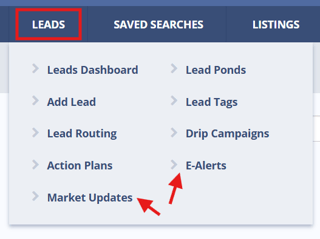
Navigate to Leads > E-Alerts in your Sierra CRM.
-
Click the “Export” button in the top-right corner of the page.

How to Export Market Update Data
-
Navigate to Leads > Market Updates.
-
Click the “Export” button in the top-right corner.

Fields Included in the Export
|
Field Name |
Description |
|---|---|
|
Pond Name |
The lead pond (if applicable) the lead is assigned to |
|
Buyer Agent |
Assigned buyer agent |
|
Seller Agent |
Assigned seller agent |
|
Lead Name |
Full name of the lead |
|
Address |
Address associated with the lead or search |
|
Phone |
Lead’s phone number |
|
Search |
Description of the saved search |
|
Price Range |
Price range criteria set in the search |
|
Locations |
Locations included in the alert or update |
|
Start |
When the alert or update was initiated |
|
Frequency |
How often alerts are scheduled to send |
|
Last Sent |
The last date an alert was sent |
|
Last Open |
The most recent open by the lead |
|
Last Click |
The last time the lead clicked within the alert |
|
Registered |
Indicates whether the lead has completed registration |
|
Source |
Original lead source |
|
Phone Status |
Status of the phone number (e.g., valid, invalid) |
|
Calls |
Number of outbound/inbound calls logged |
|
Texts |
Number of text messages sent/received |
|
Email Status |
Whether emails are being delivered |
|
Emails |
Number of emails sent |
Best Practices
-
Use the Last Open and Last Click columns to identify leads that are highly engaged or need re-engagement.
-
Cross-reference Phone Status and Email Status for deliverability diagnostics.
-
Export data regularly to monitor trends in campaign effectiveness.
Troubleshooting Common Issues
-
"I can’t find the export button."
Make sure you’re in either the E-Alerts or Market Updates page under the Leads section. The export button only appears at the top right of these pages.
-
"My export is missing leads."
The export is currently limited to the first 500 records. Use filters to narrow your list before exporting.
FAQs
- Can I export more than 500 leads at a time?
Not currently. Each export is capped at 500 records. You can apply filters to target specific segments and perform multiple exports if needed. - Can I use this export to re-import or bulk update leads?
This export is primarily for visibility and reporting. Use Sierra’s Lead Import Wizard for structured updates. - Are drip campaign metrics included in this export?
No. This export only includes metrics related to E-Alerts and Market Updates.