
Finding the right answer shouldn't slow down your workflow. Ask Sierra is an AI-powered help bar built directly into your dashboard that reads your questions and generates specific, actionable answers instantly. Unlike a standard search bar that simply lists articles, Ask Sierra scans our entire Help Center to tell you exactly how to execute a task.
Table of Contents
- Two Ways to Access Ask Sierra
- How to Control the Results
- Strategic Use Cases
- Limitations and Troubleshooting
Two Ways to Access Ask Sierra
You can access the answer engine from anywhere within the Client Admin Area. Choose the workflow that fits your style.
1. Keyboard Shortcuts (Recommended)
This is the fastest way to get help without lifting your hands from the keyboard.
- Mac Users: Press Cmd + K
- Windows Users: Press Ctrl + K
2. The Navigation Bar
You can also click the search bar located in the top navigation menu.

How to Control the Results
The punctuation you use determines how Ask Sierra responds. This distinction allows you to switch between receiving a direct answer and performing a traditional keyword search.
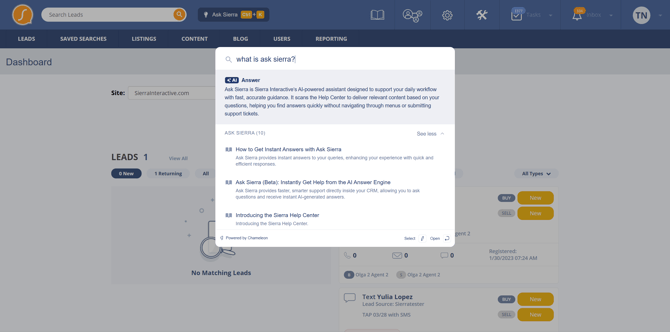
The "Ask" Mode
To generate a custom AI answer, you must end your query with a question mark (?).
- Action: Type "How do I filter for new leads?"
- Result: Ask Sierra writes a summary answer explaining the steps and provides links to source articles.
The "Search" Mode
To see a simple list of relevant Help Center articles, leave the question mark off.
- Action: Type "lead filters"
- Result: The system displays a dropdown list of related articles without generating a summary.
Strategic Use Cases
Ask Sierra excels at "How-to" questions and process instructions. Use it to quickly resolve specific scenarios during your workday.
- Prospecting: "How do I create a Smart Filter?"
- Setup: "How do I integrate my Google Calendar?"
- Customization: "Where do I customize my MLS feed?"
Limitations and Troubleshooting
While Ask Sierra is powerful, it is designed for general functionality questions rather than account-specific data analysis.
Scope of Support
The AI answers questions about how the platform works. It cannot see your private account data or explain specific events.
- Supported: "How do I check team performance?"
- Not Supported: "Why didn't John Doe get my text message?"
Device Availability
Ask Sierra is currently available on desktop browsers only. It is not accessible via the mobile app or mobile web browsers.
Common Technical Issues
If the Ask Sierra window does not open or fails to load results, check the following:
- Browser Extensions: Ad-blockers or privacy extensions (like Ghostery or Privacy Badger) can sometimes block the pop-up. Whitelist the Sierra domain or disable the extension temporarily.
- Keyboard Shortcuts: If Cmd + K or Ctrl + K does not work, ensure your browser focus is on the tab and not inside a specific text field that might override the command.