
Overview
The Agent Reporting dashboard gives managers a clear, reliable way to evaluate how agents are handling their leads. By focusing on both response speed and ongoing engagement, this report helps you quickly identify gaps, reinforce best practices, and improve overall team performance.
This guide explains how to interpret the report, what each metric means, and how to use the data to make informed coaching decisions.
Table of Contents
Why This Report Matters
Agent performance is directly tied to how quickly and consistently leads are contacted. This report helps you:
- Understand how fast agents respond to new leads
- Ensure every assigned lead receives follow-up
- Identify proactive vs. reactive communication habits
- Spot inefficiencies in lead assignment workflows
- Coach agents using clear, objective data
Where to Find the Report
You can access Agent Reporting in the Client Admin Area (CAA):
Reporting → Sierra Manager Reporting → Agent Reporting tab
It appears alongside:
- Agent Leaderboard
- End of Year Summary
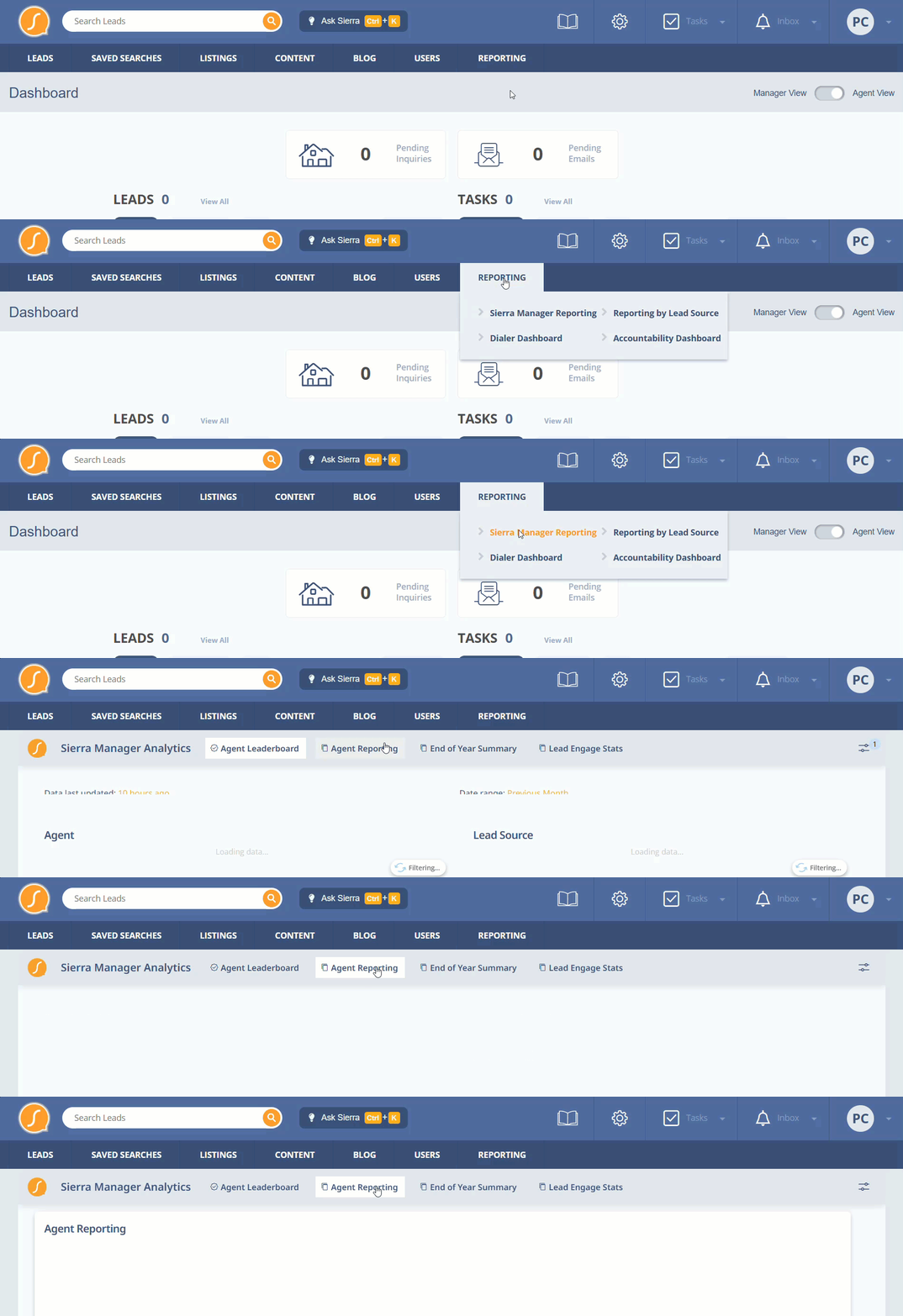
The Agent Reporting report is available to: Primary Managers & Manager-level users. If you do not see this report, you may need elevated permissions within your Sierra account.
What This Report Is Designed to Tell You
At a high level, this report helps you:
- Determine how quickly agents are responding to new leads
- Identify whether assigned leads are being actively worked
- Evaluate overall communication volume and consistency
- Spot workflow issues (such as agents working unassigned leads)
- Compare performance across agents to guide coaching
Instead of asking “Are leads being followed up with?”, you can now answer:
- How quickly?
- How often?
- By whom?
- And where are the gaps?
Important Notes
- The report updates once per day
- Activities include calls, texts, and emails logged in Sierra
- A lead in the “without activities” category means no outreach has been recorded in the system
- This report focuses on assigned vs. unassigned lead activity, not collaborator activity
Key Metrics Explained
1. Speed to Lead
These metrics focus on how quickly agents engage new leads.
Metrics include:
- New Leads – Number of newly assigned leads
- Average Time to First Contact – Time it takes an agent to first reach out
- Inbound vs. Outbound Calls, Texts, Emails – Who is initiating communication
How to interpret:
- Faster response times increase the likelihood of conversion
- Outbound-heavy activity indicates proactive behavior
- A high number of new leads + slow response time = a clear red flag
2. Consistent Nurture
These metrics show whether agents are consistently working their pipeline.
Metrics include:
- Total Assigned Leads with Activities – Leads that have been contacted
- Total Assigned Leads without Activities – Leads with no outreach
- Total Activities on Assigned Leads – Total communication volume
- Total Activities on Unassigned Leads – Outreach on leads not formally assigned
How to interpret:
- Leads without activities represent missed opportunities
- Strong performance means consistent outreach across all assigned leads
- High activity on unassigned leads suggests a process or routing issue
3. Communication Activity
These metrics track total outreach across channels:
- Calls (Inbound, Outbound, All)
- Emails (Inbound, Outbound, All)
- Texts (Inbound, Outbound, All)
How to interpret:
- Outbound activity should drive engagement
- Consistent communication patterns indicate strong follow-up habits
- Comparing agents highlights top performers and those needing support
How Managers Should Use This Report
This report is most effective when used to drive specific actions.
Workflow and Process Optimization
- High Activity on Unassigned Leads: This indicates a breakdown in your current system. Review and adjust lead routing and assignment procedures immediately.
- Assigned Leads Without Activities: These represent an immediate, critical coaching opportunity, as the agent has never attempted to contact the prospect.
Agent Behavior and Communication
- Low Outbound Communication: Encourage agents to shift from a reactive to a proactive communication style.
- High Average Time to First Contact: Establish and strictly enforce clear response-time Service Level Agreements (SLAs), such as initial contact within five minutes during business hours.
Leveraging Success
- Identifying Top Performers: Utilize the established habits and communication cadence of your highest achievers as the standard benchmark for the entire team.
Recommended Review Cadence
Daily 5-Minute Scan:
- New Leads: Crucial for identifying and acting on potential business immediately.
- Average Time to First Contact: Monitoring this metric helps prevent missed opportunities by ensuring timely engagement.
Weekly:
Focus on:
- Communication totals
- Leads with vs. without activities
Ideal for 1:1 coaching and accountability
Monthly:
Focus on:
- Activity trends over time
- Changes in response behavior
- Workflow inconsistencies
Helps set benchmarks and improve team strategy
Best Practices
- Set clear expectations for response time and follow-up
- Review the report consistently (daily/weekly/monthly cadence)
- Address untouched leads as a priority
- Ensure clean lead assignment workflows
- Use top performers as models for the rest of the team
FAQs
- How often does the report update?
The report updates once per day. It does not reflect real-time activity.
- What counts as an “activity”?
Activities include calls, texts, and emails that are logged within Sierra.
- What does “Assigned Leads without Activities” mean?
It means the agent has not made a single recorded attempt to contact those leads through Sierra.
- Why is activity on unassigned leads important?
It may indicate that agents are working leads before they are properly assigned, which can point to workflow or routing issues that need to be addressed.
- What is a good benchmark for response time?
Industry best practices suggest contacting new leads within 5 minutes for the highest chance of conversion.
- How should I use this report in coaching?
Use it to:
-
- Identify specific gaps (speed, consistency, or activity)
- Set clear expectations
- Hold agents accountable
- Share best practices from top performers