
Official Documentation: https://api.sierrainteractivedev.com
The Sierra Interactive API (Application Programming Interface) lets different software applications talk to each other. Using the API, you or a developer can build custom connections between your Sierra platform and the other tools you use every day, creating a seamless, automated workflow for your business.
Table of Contents
Why This Feature Matters
As a real estate professional, you likely use a dozen different tools to manage marketing, communication, and follow-up. The problem is that these tools often don't communicate, forcing you to manually export and import lead lists, update contact information in multiple places, or remember to trigger tasks in another system. This manual work is not only time-consuming but also prone to errors that can let opportunities slip through the cracks.
The Sierra API solves this by acting as a secure bridge between your CRM and other software. It empowers you to automate workflows, ensuring your data is always accurate and up-to-date everywhere. This saves you valuable time, reduces manual errors, and lets you build a powerful, customized tech stack that works for your business.
Before You Begin
- Decide who's building the connection. Most agents don't write custom integrations themselves so you'll typically hand your API key to a web developer, or use a pre-built connector through a platform like Zapier or API Nation, which already has a built connection to Sierra. If neither applies to you, the steps below are all you need to generate the credential itself.
- Have admin access ready. Generating an API key requires access to your account's Integrations settings.
How to Generate Your API Key
Because the API requires technical knowledge, the most common way to use it is by working with a web developer or an integration service. They will use your secure API key to build the connection.
1. Gear Icon > Integrations > Sierra Interactive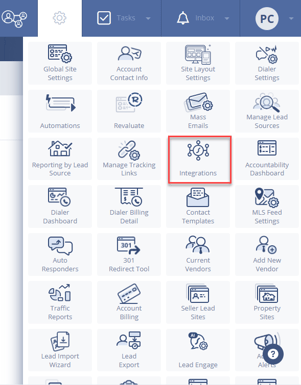
2. Copy API Key
3. Provide the key to your developer or integration platform 
Protect your API key and provide it to trusted sources only. If your key is ever compromised, you can generate a new one by disabling and re-enabling the integration. The previous key will be invalidated and stop working on all integrations that used it.
Best Practices
- Limit who holds the key. Treat your API key like a password and only share it with the developer or platform actively building your integration.
- Rotate the key if a working relationship ends. If a developer or contractor who had your key is no longer working with you, generate a new key so their access is revoked.
- Keep a record of what's connected. If you have multiple integrations built against your API key, keep a simple log of what each one does as it makes troubleshooting and future key rotations much faster.
Troubleshooting Common Issues
-
My integration stopped working after I generated a new API key.
Regenerating your key invalidates the previous one immediately. Any integration still using the old key will need to be updated with the new key by your developer or integration platform. -
My developer says the API key isn't working.
Confirm the key was copied in full with no extra spaces, and that it was generated from the correct account.
FAQs
-
Do I need to be a developer to use the API?
No. While the API itself is a developer tool, you can benefit from it by hiring a developer or using a third-party integration platform that has already built a connection to Sierra. -
Is API access included in my plan?
API access may depend on your subscription plan. If you have any questions about availability, please contact our Support team for clarification. -
What if a tool I use wants to integrate with Sierra?
If a third-party service provider wishes to build a public integration, please have them contact us at support@sierrainteractive.com with a summary of their product and what they aim to build. Our team will review the request and coordinate the next steps.