
Table of Contents
Why This Feature Matters
Video messages can dramatically increase engagement and trust with leads. By integrating BombBomb with Sierra, you can address the challenges of capturing attention in a crowded inbox. This integration allows you to:
- Send BombBomb videos directly from Sierra’s Email Editor.
- Quickly access and send videos using BombBomb Quick Send.
- Personalize communication to stand out.
Step-by-Step Instructions
Connect BombBomb to Your Sierra Account
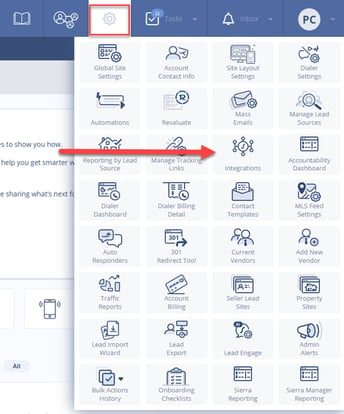
- Go to Gear Icon > Integrations.
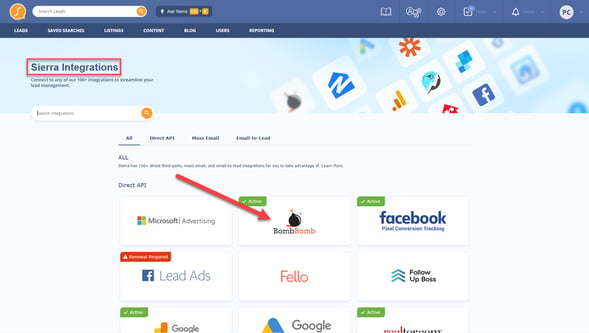
- Click on BombBomb from the list of integrations.
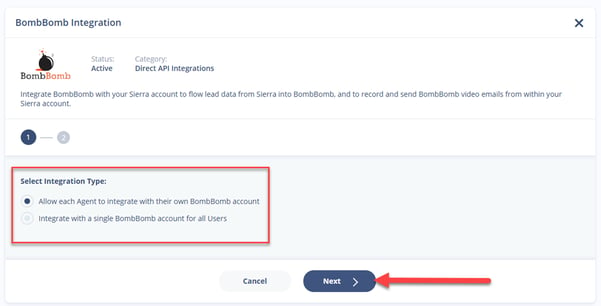
- Select the Integration Type
- Enter the API key.
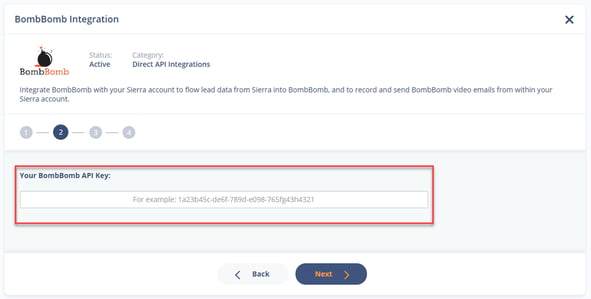
- Click Connect.
✅ Once connected, you can always edit or remove the integration later.
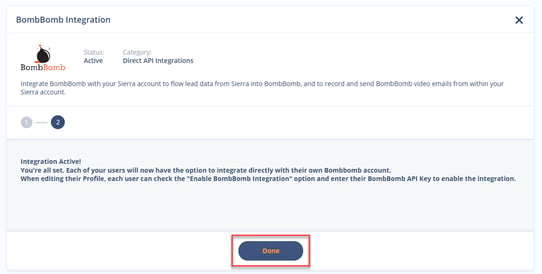
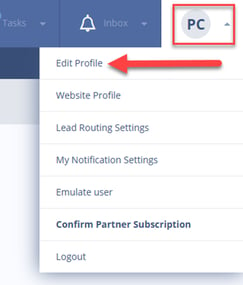
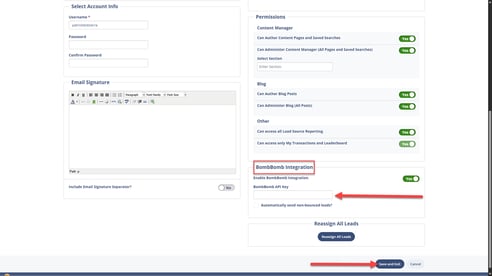
If choosing the "Allow each Agent to integrate with their own BombBomb account"
Each user will need to edit their own profile and add their BombBomb API key.
Access BombBomb Inside Sierra
- Navigate to any lead profile from the Leads tab in the Admin.
- You’ll find BombBomb in two locations:
- Email Editor toolbar button.
- Quick Send button in the lower-left sidebar under Other Preferences.
Using the BombBomb Toolbar in the Email Editor
- Open the Email Editor within a lead profile.
- If BombBomb videos exist in your account, the toolbar will display a BombBomb icon.
- Click it to access a dropdown of your saved videos.
- Select a video to instantly insert it into your email.
⚠️ The toolbar button only appears once videos are saved in your BombBomb account.
Best Practices
- Use video emails for warm leads or follow-ups to stand out and boost open rates.
- Keep BombBomb videos short, personal, and relevant to the lead’s behavior or status.
- Leverage BombBomb’s tracking tools to gauge lead engagement, ensuring you know what resonates.
Troubleshooting Common Issues
-
BombBomb toolbar button not visible
Make sure you’ve saved at least one video in your BombBomb account. The button will appear only when videos are available. -
Integration connection fails
Double-check your API key and ensure it’s copied correctly from your BombBomb account.
FAQs
- What is BombBomb, and how does it work with Sierra?
BombBomb is a video email integration. Once connected, you can send BombBomb videos directly from Sierra's Email Editor or use BombBomb Quick Send from a lead's profile. - Can I disconnect or edit the BombBomb integration later?
Yes. Once connected, you can edit or remove the integration at any time from the Integrations Manager. - Why don't I see the BombBomb icon in my Email Editor toolbar?
The toolbar button only appears once you've saved at least one video in your BombBomb account. If no videos are saved, the icon won't display. - My BombBomb integration won't connect. What should I check first?
Double-check that your API key was copied correctly from your BombBomb account and re-enter it in the Integrations Manager. - When should I use video messages instead of a standard email?
They work best for warm leads or follow-ups, kept short, personal, and relevant to the lead's recent behavior or status.