
Table of Contents
Why This Feature Matters
Voicemail drops or ringless voicemails help your team:
- Make an immediate impression with new leads.
- Save time by automating first contact.
- Deliver consistent, pre-recorded messaging.
- Increase engagement without manual outreach.
Before You Begin
Confirm the following before creating or running a Traditional Action Plan:
- Sierra Dialer enabled at the account level
- Sierra Dialer connected at the user level
Step-by-Step Instructions
Create a Tracking Link
-
Navigate to any frontend page on your Sierra site
-
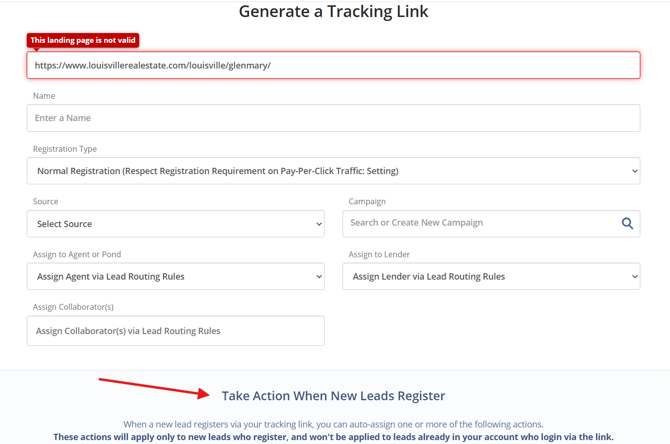
Generate a tracking link using the Tracking Link Generator
-
For more help, see: Create Tracking Links to Capture More Leads
Scroll to “Auto-Send a Voicemail”
-
In the “Take Action When New Leads Register” section, select “Auto-Send a Voicemail”
Add a Voicemail Message
You have two options:
Option 1: Record a New Message on the Spot
-
Click + Record New Message
-
Give it a title
-
Choose one of three methods to add the voicemail:
-
Record with a connected headset
-
Call in using your phone
-
Upload a .mp3 or .wav file
-
Option 2: Use a Pre-Recorded Message
-
Click Voice Messages Manager
-
Choose a voicemail from your own or another user’s saved messages
-
Preview the message to ensure it’s the correct one
Set the Delivery Timing
-
Choose to send the voicemail immediately after registration
-
Or delay up to 60 minutes post-registration
Give Agent-Level Users Access
-
Go to Tracking Link Settings
-
Enable “Auto-Send a Voice Message” for your agent-level users if desired
Monitor Usage and Billing
-
Each account gets 500 voicemail drops/month for free
-
Additional usage: $5.00 per 100 voicemails
-
Email alerts sent at 60% and 90% of usage
-
View your usage in Dialer Billing Details within the admin
Best Practices
-
Use personalized, friendly voicemails to build rapport
-
Test recordings to ensure quality and clarity
-
Avoid overly salesy scripts and focus on value instead
-
Consider using a slight delay (5–10 mins) to feel more natural
Troubleshooting Common Issues
-
Voicemail not sending
Ensure the user is connected to the Sierra Dialer and the lead registered with a phone number -
Can’t access the voicemail drop feature
Confirm permissions are granted in Tracking Link Settings
FAQs
-
Does the phone ring when voicemail is sent?
No, voicemails are delivered silently there is no ringing involved. -
Which number appears as the Caller ID?
Your account’s Buyer’s Agent Dialer Number is shown. -
Can I use this for seller leads too?
Yes, if they register via a tracking link and provide a phone number. -
Is there a limit to how many messages I can send?
500 free drops per month; additional blocks are billed automatically.