
Table of Contents
Why This Feature Matters
Action Plans automate lead follow-up and task management in Sierra Interactive. Personal Action Plans and Account-Level Action Plans work differently: a Personal Action Plan is visible and usable only by the agent or lender who created it, while an Account-Level Action Plan is available to everyone on the account.
When an agent builds an effective follow-up sequence, it's natural for a manager to want that same sequence rolled out to the whole team. But Personal Action Plans can't be shared or converted directly. This is by design. It keeps account-wide processes intentional, built only by users with the access level to manage them.
How to Recreate a Personal Action Plan at the Account Level
- Have the Agent or Lender share the steps of their Personal Action Plan with a Manager.
- Log in to the Manager or Primary Manager account.
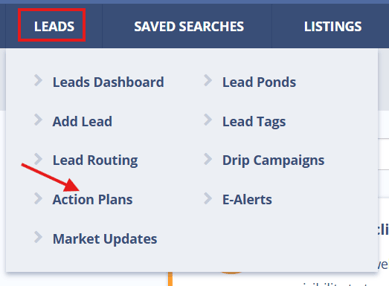
- Go to Leads > Action Plans.
- Click Create New Action Plan.
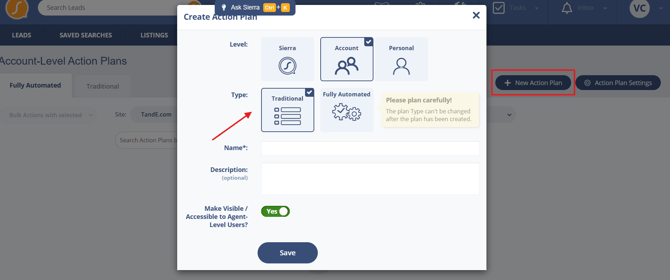
- Rebuild the plan step-by-step, including:
- Task assignments
- Message templates
- Timing and delays
- Save the Action Plan, making it available to all users in the account.
- Train your team on how and when to use the new Account-Level Action Plan.
Best Practices
- Standardize your team’s lead follow-up by using Account-Level Action Plans created by Managers.
- Audit Personal Plans created by agents and identify which should be recreated at the Account level.
- Document and share naming conventions so plans are easily recognizable and properly categorized.
- Limit Personal Plans to one-off workflows or testing sequences. Promote Account-Level Plans for all team-wide follow-up strategies.
- Reinforce usage of shared plans during onboarding and training sessions.
Troubleshooting Common Issues
- Agent cannot share an Action Plan with another team member.
Confirm if the Action Plan is Personal. Personal Plans can only be seen and used by the creator. - Manager cannot find a plan that was created by an agent.
The agent likely created a Personal Plan. Request a copy of the plan details to rebuild it under the Manager's account. - Agents are using inconsistent follow-up methods.
Audit Personal Plans, then recreate the most effective ones as Account-Level Plans.
FAQs
-
Can I convert a Personal Action Plan to an Account-Level Plan?
No. Personal Action Plans must be manually recreated by a Manager or the Primary Manager to be used at the account level. -
Who can create Account-Level Action Plans?
Only Manager-Level users and the Primary Manager can create and manage Account-Level Action Plans. -
Can multiple users access a Personal Action Plan?
No. Personal Action Plans are restricted to the user who created them.