
Overview
Inbound calls and texts from unknown numbers often represent new opportunities, but without automation they are easy to miss. This is especially true for teams using paid marketing, signage, and text-first communication, where speed and consistency directly impact conversion.
This feature helps you automatically turn those moments into actionable leads by:
- Creating lead records from unknown callers and texters.
- Routing those leads to the right agents based on your routing rules.
- Preserving the original call or text conversation for better context and follow-up.
The result is faster response times, fewer missed opportunities, and a more reliable way to capture and manage inbound demand across all your channels.
Table of Contents
Before You Begin
Make sure that:
- You are the Primary Manager or Manager level user.
- Your Sierra Dialer numbers are active.
- Any users you plan to include in routing rules:
- Are connected to the Sierra Dialer.
- Have a voicemail greeting recorded.
- Have confirmed their connection in Users tab → Users → Connections.
How Unknown Numbers Are Handled
An unknown number is any phone number not associated with an existing lead in your Sierra account.
When an unknown number contacts a Sierra Dialer number:
- Calls
- If no rule exists, the call is forwarded to your Catch-All number based on your Voice and Text Settings.
- If a rule exists, the call is routed based on that rule.
- Texts
- A lead record is automatically created (if enabled).
- The lead is routed according to your routing rules.
How to Create a Routing Rule for Unknown Numbers
The process for creating and routing leads from unknown numbers applies to both calls and texts.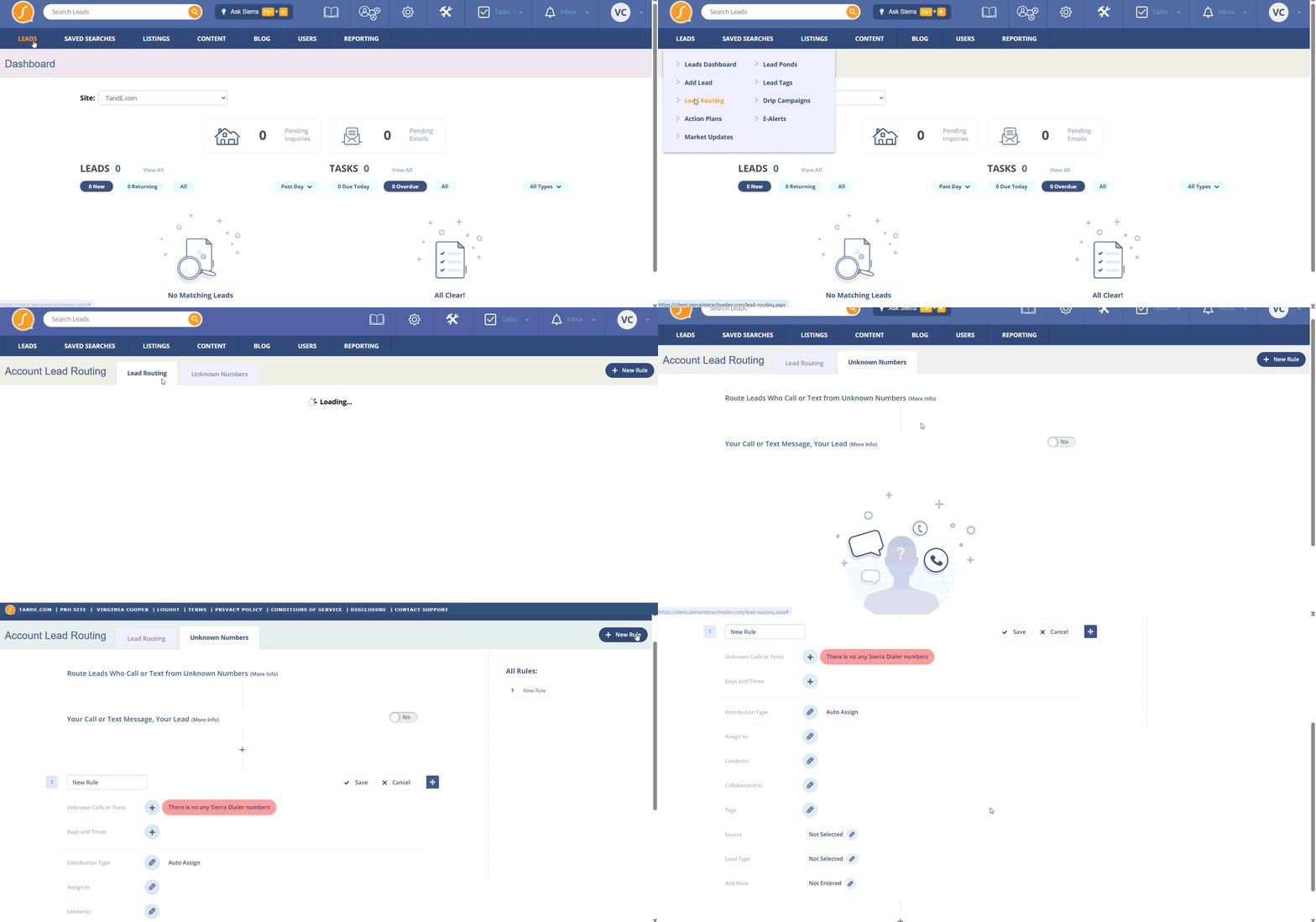
- Go to Leads tab → Lead Routing → Unknown Numbers.
- Click the + icon to add a new rule.
- Select the Sierra Dialer number(s) the rule applies to.
- Choose the days and times the rule should be active.
- Select a routing method:
- Auto-Assign — Assigns leads sequentially to agents and connects or notifies them.
- First to Claim — Notifies all selected agents at once; the first agent to claim the lead is assigned.
- (Optional) Configure additional settings:
- Lead Source: Assign a source value.
- Lead Type: Specify as Buyer or Seller.
- Tags: Add tags for categorization.
- Lender Assignment: Optionally assign a lender.
- Automations: Auto-send a text to the lead and/or add a note to the lead record.
- Click Save.
Best Practices
- Create separate rules for different marketing channels (for example, one for Google Ads and one for open house signage) so you can track performance by source.
- Use First to Claim during business hours to maximize response speed, and Auto-Assign after hours to avoid notifying the entire team.
- Always assign a Lead Source and Tags so reporting and follow-up automation work correctly.
- Enable auto-text automations so new leads immediately receive a response, even if an agent is unavailable.
Troubleshooting Common Issues
Leads are not being created from texts
-
Confirm that lead creation from unknown numbers is enabled.
-
Make sure the inbound message is going to a Sierra Dialer number.
-
Verify that the number is not already attached to an existing lead.
Calls are not routing as expected
-
Check that your routing rule is active for the current day and time.
-
Confirm the correct Sierra Dialer number is selected in the rule.
-
Ensure a Catch-All number is configured for times when no rule is active.
Agents are not receiving notifications
-
Confirm the agent is included in the routing rule.
-
Verify the agent is connected to the Sierra Dialer.
-
Make sure the agent has recorded a voicemail greeting.
-
Check that the agent’s notification settings are enabled.
FAQs
-
What counts as an “unknown number?”
An unknown number is any phone number that does not match an existing lead record in your Sierra account. -
Will this create duplicate leads?
No. If the phone number already exists on a lead, Sierra will not create a new lead and will route the interaction to the existing record. -
Can I route calls and texts differently?
Yes. You can create separate routing rules and schedules based on the Sierra Dialer number, time of day, or marketing source. -
What happens if no one claims the lead?
If no one claims the lead within the configured time window, the system will follow your fallback behavior (such as continuing the rotation or sending the call to your Catch-All number). -
Can I change the placeholder name or email?
No. These are system-generated to ensure the record can be created, but you can update them once the lead is claimed.