
Summary
DraftAI is a built-in AI writing tool that generates a complete blog post or community page draft from a short prompt. This article covers what it does, where to find it, and how to use it effectively.
Table of Contents
- Why DraftAI Matters
- Step-by-Step Instructions
- What DraftAI Will and Won't Do
- Best Practices
- Troubleshooting Common Issues
- FAQs
Why DraftAI Matters
- Hyperlocal content (neighborhood guides, community pages, blog posts) is one of the strongest drivers of organic search visibility, but finding time to write it consistently is hard.
- DraftAI removes that bottleneck by generating a full draft, including SEO metadata, in under 60 seconds from a plain-language prompt.
- It's included at no extra cost for every Sierra customer, with nothing to install, activate, or log into separately.
Step-by-Step Instructions
Generating a Draft
-
Open a blog post or content page in the Sierra content editor. DraftAI is only available in these two content types.
-
💡First time writing content? Check out Using the Content Editor to Create Content Pages
-
- Click the DraftAI button in the editor toolbar.
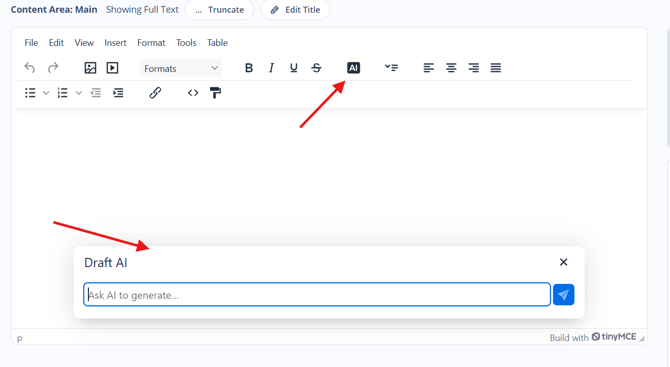
- Enter a prompt describing the content you want. You can be general or specific, for example:
- "Write a neighborhood guide for Midtown Atlanta"
- "Write a blog post about tips for first-time home buyers"
- "Explain what a ranch-style home is"
- ⚠️ Want stronger first drafts? See DraftAI Prompts and Best Practices for SEO and AI Discoverability for prompt-writing techniques, SEO/AEO targeting, and pre-publish review habits.
- Submit the prompt. DraftAI generates a complete draft, typically in under a minute.
Reviewing and Publishing Your Draft
- Your draft appears directly in the editor and includes:
- Article content: title, intro, body, and conclusion
- Content metadata: a suggested meta description and keywords
- Suggested links: relevant internal and external links
- A compliance reminder checklist
- Review the full draft and edit it like you would any other content in Sierra.
- Look for any [AGENT: Verify...] placeholders. These mark statistics or market claims DraftAI couldn't confirm. Replace them with current, verified MLS data before publishing.
- Copy the suggested meta description and keywords into your page's SEO settings, if you're using them.
- Publish when you're ready.
⚠️ DraftAI generates a first draft, not a final one. Review all content especially flagged placeholders before publishing. You're responsible for Fair Housing compliance on anything you publish.
What Draft AI Will and Won't Do
Will do:
- Write blog posts, neighborhood guides, home style explainers, and other real estate educational content
- Flag Fair Housing topics for your review
- Flag unverified statistics with [AGENT: Verify...] placeholders rather than inventing numbers
- Suggest SEO keywords, meta descriptions, and internal/external links
Won't do:
- Reference demographic groups in connection with housing
- Include crime stats or school ratings as desirability signals
- Present unverified statistics as facts
- Write content outside of real estate topics, or outside of blog posts and community pages (for example, landing pages or MLS listing descriptions)
Best Practices
- Include location and content type in your prompt for the most relevant first draft.
- Treat every draft as a starting point: Review it, add your local knowledge, and personalize it before publishing.
- If a draft isn't quite right, rephrase your prompt with more detail about tone, length, or angle and generate again.
- Keep an eye on usage if you're generating a high volume of content: DraftAI allows 20 requests per minute and 200 requests per user per day.
Troubleshooting Common Issues
- I don't see the DraftAI button in my editor.
Confirm you're working inside a blog post or content page editor. DraftAI doesn't appear in other content types. If the button is still missing, submit a support ticket. - I hit a rate limit error.
Wait before retrying as the limit resets within the minute. If you consistently need a higher volume for an automated workflow, submit a support ticket to discuss your use case. - The draft doesn't match what I had in mind.
Rephrase your prompt with more detail about tone, length, location, or angle, then generate again. You can also edit the output directly in the editor.
FAQs
-
Is DraftAI available on all Sierra plans?
Yes. DraftAI is included at no additional cost for every Sierra customer, with no upgrade required. -
Which content types can I use DraftAI with?
Blog posts and content pages only. It isn't available in other areas of the platform, such as landing pages or MLS listing descriptions. -
Will AI-generated content hurt my SEO?
No. Google evaluates content quality and helpfulness, not how it was written. Reviewing and personalizing your draft before publishing helps ensure it's genuinely useful to readers. -
Is content from DraftAI Fair Housing compliant?
DraftAI is designed with Fair Housing guidelines in mind, but Sierra cannot guarantee compliance. You are responsible for reviewing and editing any content before publishing to ensure it meets all applicable Fair Housing requirements. -
Why does my draft have placeholders in it?
DraftAI doesn't fabricate statistics. Any market claim it can't verify is marked with an [AGENT: Verify...] placeholder for you to confirm with current MLS data before publishing.