
Table of Contents
- What E-Alerts Are
- How E-Alerts Are Created
- How E-Alerts Drive Lead Engagement
- E-Alerts and Website SEO
- Best Practices
- FAQs
What E-Alerts Are
E-Alerts are automated listing emails sent to your leads whenever new properties match a saved search. When a lead has an active E-Alert, Sierra monitors your IDX feed and sends matching listings on a schedule you control, from immediately to monthly.
E-Alerts keep your leads connected to your website without requiring manual outreach on your part. Each email links back to the listing on your Sierra site, where leads can save searches, request showings, or get in touch.
⚠️ E-Alerts require a saved search. You cannot create an E-Alert without first defining listing criteria (location, price range, property type, etc.) through a saved search.
📄 For full setup instructions, see: How to Send Automated Listing Emails and Market Updates to Leads
How E-Alerts Are Created
There are two ways E-Alerts get added to a lead's profile:
Option 1: Manually from a Lead's Profile Open the lead's detail page, go to the Searches tab, and click Create E-Alert. Set the listing criteria and frequency, then save. This is the most common method and gives you full control over the search parameters. 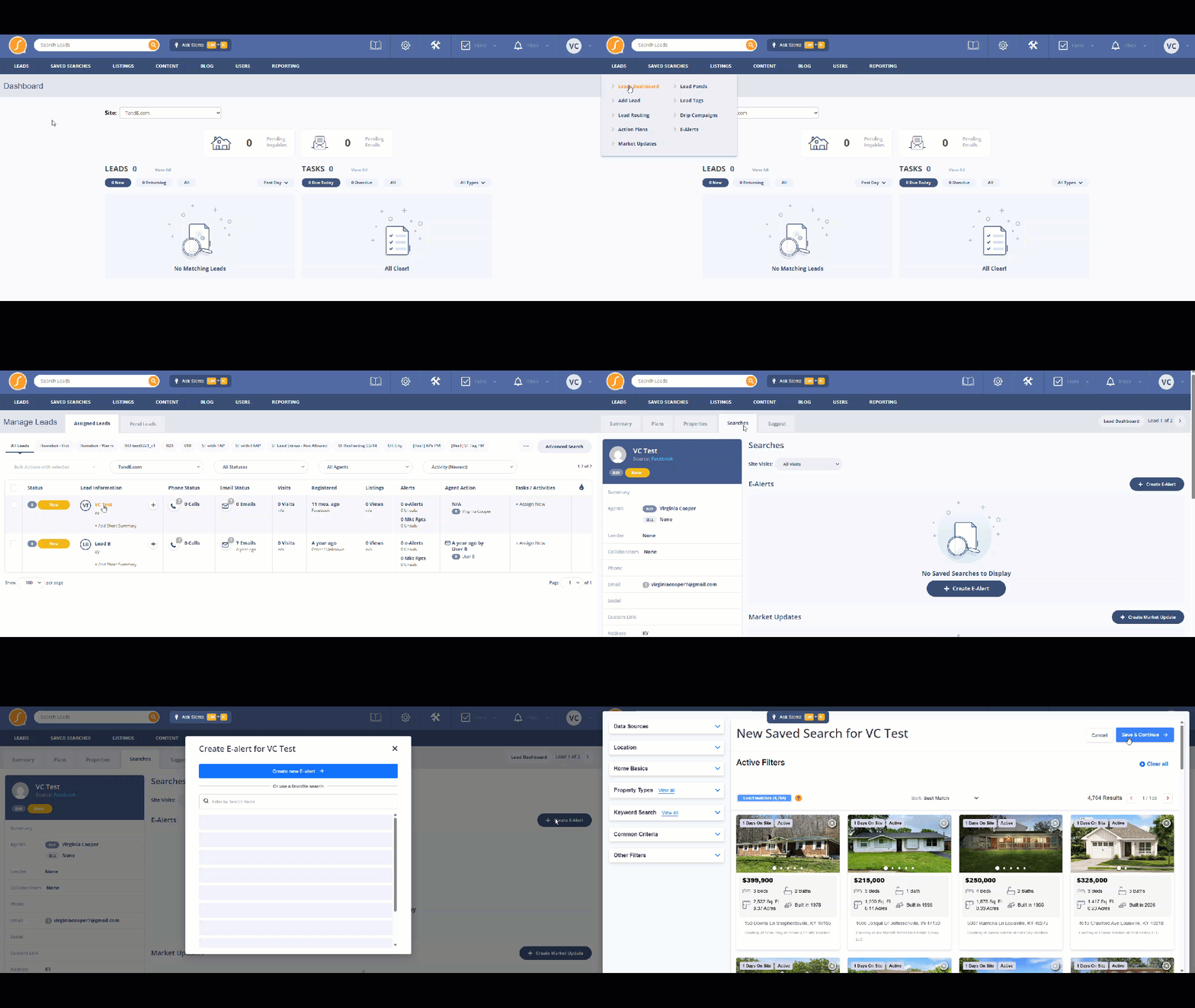
Option 2: Automatically via Lead Routing Rules If you have a Lead Routing Rule with the Auto-Create E-Alert option enabled, Sierra automatically creates an E-Alert for every lead routed through that rule. This is useful for ensuring no new lead enters your CRM without an active listing alert.
📄 For Lead Routing Rule setup, see: Lead Routing Rules
How E-Alerts Drive Lead Engagement
E-Alerts create consistent, low-effort touchpoints between you and your leads. Because each email contains current listings matched to a lead's criteria, they provide genuine value which increases the likelihood a lead opens, clicks, and returns to your site.
Key engagement benefits:
- Brings leads back to your website. Every E-Alert links to active listings on your Sierra site, driving repeat visits without you manually reaching out.
- Creates natural follow-up opportunities. When a lead clicks on a listing, you get activity data in the CRM — a signal to reach out at the right moment.
- Keeps your brand visible over time. Leads who aren't ready to buy today still receive regular, relevant communication from you, keeping you top-of-mind when they are ready.
- Works alongside your other outreach. E-Alerts run in the background while you layer in Action Plans, calls, or texts so your pipeline stays active even during busy periods.
📄 For strategies beyond buyer leads, see: How Else Can I Use E-Alerts Beyond Just Sending Listings to Buyers?
E-Alerts and Website SEO
Each time a lead clicks through an E-Alert to a listing on your Sierra site, that visit counts toward your site's traffic. Consistent, repeat traffic from engaged users sends positive signals to search engines indicating your site contains content people actively want to see.
This is most effective when:
- Listing pages on your site are optimized with descriptive titles, neighborhood-level content, and relevant metadata
- Your site has supporting content (community pages, market reports, blog posts) for leads to explore after viewing a listing
- E-Alert frequency is calibrated well enough that leads open regularly rather than tuning out
E-Alerts alone won't move your SEO rankings in a measurable way. The SEO benefit comes from combining engaged return traffic with well-structured, content-rich pages on your Sierra site.
Best Practices
- Enable Auto-Create E-Alert in your Lead Routing Rules so every new lead enters your CRM with an active listing alert from day one.
- Name saved searches clearly — the search name is visible to leads in their alert emails. Use descriptive names like "Scottsdale Condos Under $600K" instead of "Buyer Search 1."
- Set criteria broad enough to produce results, narrow enough to stay relevant. An E-Alert that never sends listings because criteria are too restrictive provides no value.
- Match frequency to lead temperature. Active buyers benefit from daily or immediate alerts; long-term leads or past clients do better on weekly or monthly cadences.
- Review E-Alert activity in the lead's communication history to see open and click data and use that as your signal to follow up.
FAQs
-
What's the difference between an E-Alert and a Market Update?
E-Alerts send new listing matches to buyer leads based on saved search criteria. Market Updates send broader market activity data and are typically used for seller leads. Both are built from saved searches and configured from the lead's Searches tab. For Market Update setup, see: Setting Up Market Updates for Seller Leads -
What happens if a lead unsubscribes from E-Alerts?
They stop receiving listing emails, but their lead record stays active in your CRM. You can still reach out through other channels, and the E-Alert can be recreated if they re-engage. -
Can I edit an E-Alert after it's been created?
Yes. Open the lead's detail page, go to the Searches tab, and update the saved search criteria or frequency at any time. -
Will E-Alerts send if there are no new matching listings?
No. Sierra only sends an E-Alert email when new listings match the saved search criteria. If nothing new hits the market, no email is sent. -
What happens if a lead ignores E-Alerts for a long time?
Sierra automatically adjusts sending frequency for leads who haven't opened E-Alerts in an extended period to protect email deliverability. Leads may receive a re-engagement confirmation email before alerts are paused. For details on this behavior, see: Automatic Adjustments to E-Alert Sending Frequencies