
Table of Contents
Overview
The First to Claim distribution type allows new leads to be offered to multiple agents simultaneously via phone call. The first agent to answer and accept the call is automatically assigned the lead.
This method prioritizes speed to lead, helping your team connect with prospects as quickly as possible.
When to Use First to Claim
Use this distribution type when your goal is to:
- Maximize speed of response to new leads
- Create a competitive, fast-paced environment for agents
- Ensure leads are contacted immediately
Before You Get Started
To use First to Claim, make sure:
- The Sierra Dialer is enabled at the account level
- Each participating agent is connected to the dialer at the user level
Without both steps completed, calls will not be delivered to agents.
To set up the Dialer visit: Mastering the Sierra Dialer: A Complete Guide to Setup & Strategy
How to Set Up First to Claim
- Login to your Sierra Client Admin Area (CAA).
- Click the Leads tab in the main header
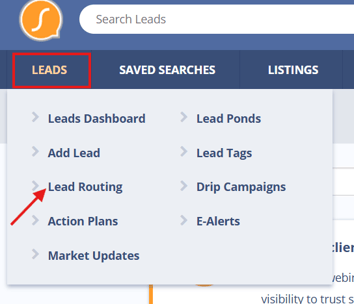
- Go to Lead Routing
- Add a new rule or edit an existing one
- In the Distribution Type dropdown, select First to Claim
- Set your “Only Call Between” hours
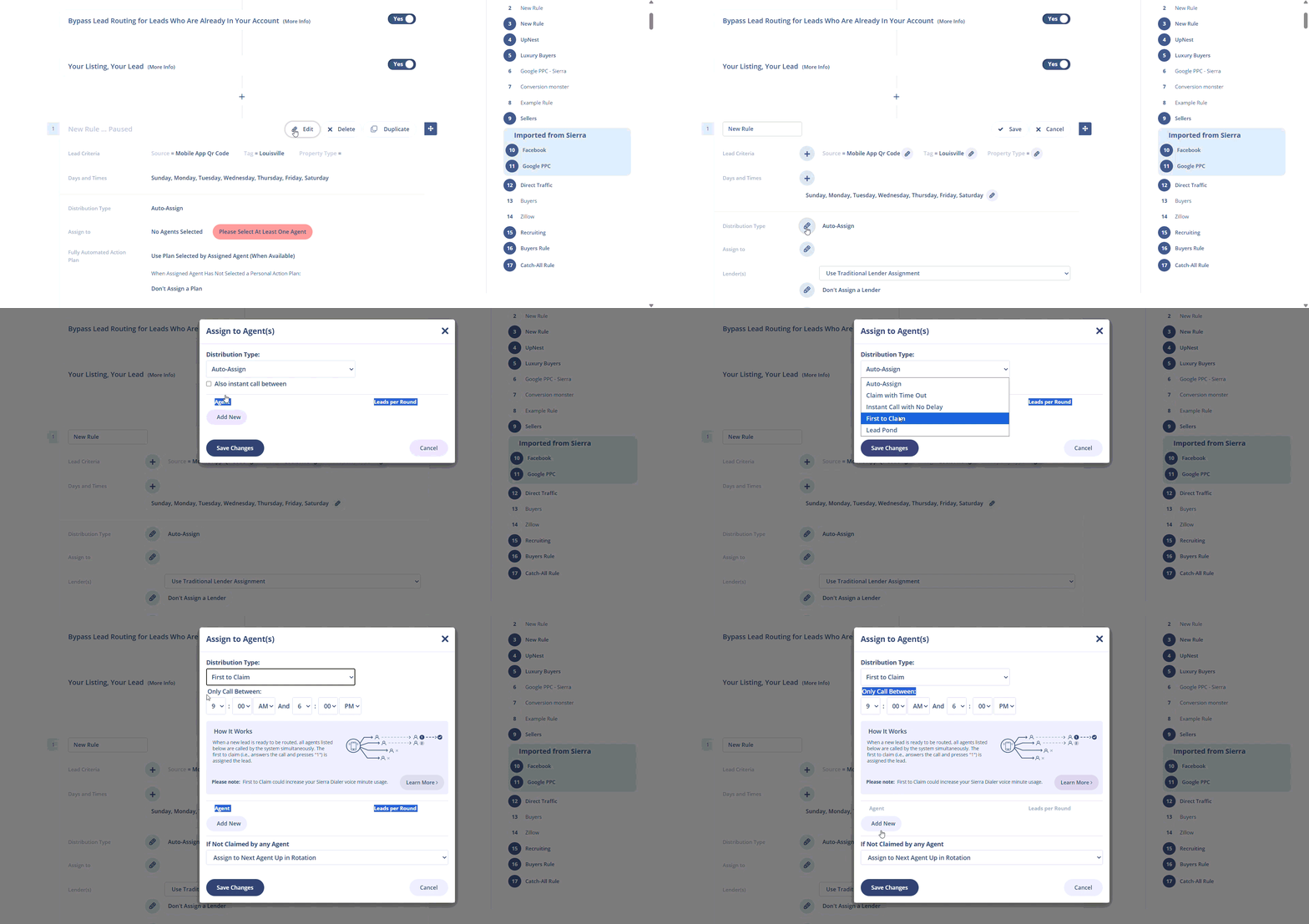
- Add the agents you want included in the rule
- Choose what happens if no agent claims the lead
You can use First to Claim in multiple routing rules across your account.
How It Works
- When a lead registers during your defined calling hours:
- All agents in the rule are called simultaneously for every new lead
- Agents hear a prompt that a new lead is available
- Agents must both answer the call and press “1” to accept
👉 The lead is assigned to the first agent who completes both actions.
Once assigned:
- The dialer immediately connects the agent to the lead
- The call is logged on the lead record
- If enabled, the call is recorded
Important: If multiple agents answer the call, only the first agent to press “1” will be assigned the lead.
Note on “Leads per Round”:
-
When calls are placed during your defined hours, all agents are contacted simultaneously regardless of the “Leads per Round” settings.
-
These settings only apply if the lead is auto-assigned (for example, outside calling hours or if no agent claims the lead).
What Happens If No One Claims the Lead
If no agent answers and accepts the call, you can choose one of the following:
- Assign to next agent in rotation
- Assign to a specific catch-all user
This ensures every lead is still assigned, even if no one is available to claim it.
Behavior Outside Calling Hours
If a lead is routed outside of your “Only Call Between” hours:
- No calls are placed
- The lead is automatically assigned to the next agent in rotation
In this scenario, the “Leads per Round” settings will apply.
Dialer Billing Considerations
Using First to Claim may increase dialer usage:
- If multiple agents answer the call, each answered call may count toward billed minutes
- Each answered call may be billed for a minimum of one minute, even if that agent does not ultimately claim the lead
Plan details:
- Includes 2,500 free minutes per month
- Additional usage is billed at $25 per 1,000 minutes
- Email alerts are sent when you reach:
- 60% of your monthly usage
- 90% of your monthly usage
You can monitor usage anytime, go to Gear Icon → Dialer Billing Detail page.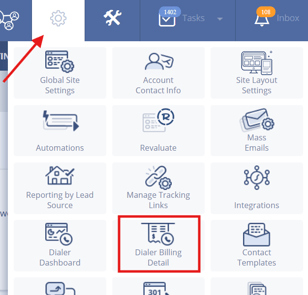
Troubleshooting Common Issues
-
Agents are not receiving calls
If agents are not receiving calls, confirm that the Sierra Dialer is enabled at the account level, each agent is properly connected to the dialer, the correct agents are included in the routing rule, and the lead is being routed during the configured “Only Call Between” hours.
-
Calls are not being placed for some leads
Confirm that the lead registered during your configured calling hours, since leads registered outside those hours will be auto-assigned instead of triggering calls.
-
An agent answered but did not receive the lead
Confirm that they pressed “1” to accept the lead, as another agent may have accepted it first.
-
Leads are being auto-assigned instead of claimed
The lead may have been routed outside calling hours, no agent may have answered and accepted the call, or your fallback setting may be assigning the lead to the next agent or a catch-all user.
-
Billing seems higher than expected
Keep in mind that billed minutes may increase when multiple agents answer, and each answered call may be billed for a minimum of one minute.
FAQs
- Do all agents get called every time a lead comes in?
Yes. During your configured calling hours, all agents in the rule are called simultaneously for every lead. - Does “Leads per Round” apply to First to Claim?
No. “Leads per Round” does not apply when calls are being placed.
It only applies when leads are auto-assigned (outside calling hours or when no one claims the lead). - What happens if two agents answer at the same time?
The lead is assigned to the first agent who presses “1” to accept. - What happens if no one answers?
The lead will be assigned based on your fallback setting:
Next agent in rotation
Or a designated catch-all user - Can I limit which agents receive these calls?
Yes. You control this by selecting which agents are included in each lead routing rule. - Will this increase my dialer usage?
It can. If multiple agents answer, each call may count toward billed minutes even though only one agent receives the lead.