
Table of Contents
Why This Feature Matters
Emojis are a small addition that can make your messages feel more personal and conversational, which matters when you're competing for a lead's attention in their text inbox. Used well, they can:
- Make your messages feel more human and less like a form letter
- Help your texts stand out, especially in mass outreach
- Reinforce tone when a message might otherwise read as flat
How to Open the Emoji Picker
⚠️ Don't see text messages or emojis? Your Sierra Dialer may not be activated. Click here to get started.
When composing any text message in Sierra:
- Look for the emoji icon in the text compose toolbar.
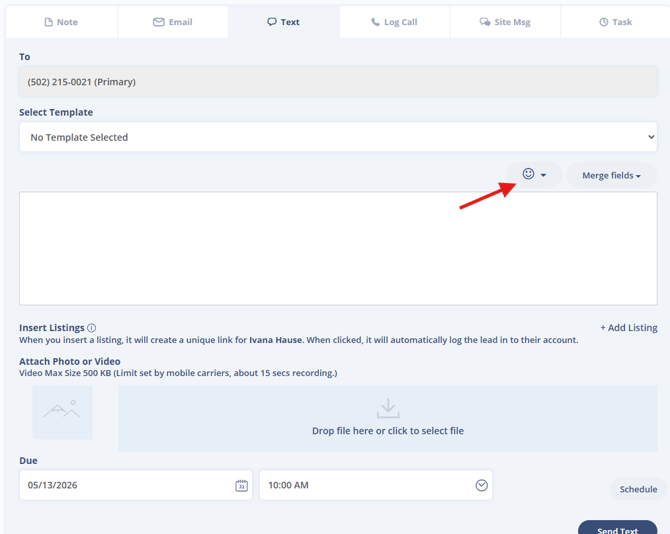
- Click it to open the emoji dropdown menu.
- Browse or scroll to find the emoji you want, then click to insert it into your message.
Sierra's emoji picker includes 330+ emojis.
Where You Can Use Emojis in Sierra
The emoji picker is available anywhere in Sierra where you can compose a text message, including:
- Manual texts from a lead detail page or the Inbox
- Mass texts from the Lead Dashboard
- Text message contact templates
- Auto-responders
- Tracking link messages via the Tracking Link Generator
Viewing Emoji Use in Lead History
Once a text with emojis is sent, it appears as-is (emojis included) in:
- The lead's correspondence history on their detail page
- The message history panel when you send follow-up texts
Best Practices
- Keep it purposeful. One or two well-chosen emojis add personality; a string of them can look unprofessional.
- Stick to common emojis. Widely-recognized symbols (✅ 🏡 👋) render consistently across devices. Newer or obscure emojis may display as a box or question mark for some recipients.
- Test before you scale. If you're using an emoji in a mass text for the first time, send a test message to yourself first to confirm it renders as expected.
- Match your tone. Emojis work well in warm, conversational messages. They're usually out of place in compliance notices or formal follow-ups.
Troubleshooting Common Issues
- I don’t see the emoji option when composing a text
Confirm the Sierra Dialer is fully connected at both the team and user levels
- Emojis aren’t displaying correctly for a lead
Some emojis may render differently depending on the recipient’s device or mobile carrier
FAQs
- Can I create a text template that includes emojis?
Yes, you can add emojis to text templates for reuse across multiple leads.
- Can I use emojis in mass texts?
Yes, the emoji picker is available when sending mass texts from the Lead Dashboard.
- Are emojis available in automated messages?
Yes, you can include emojis in auto responders and tracking link texts.