
Why This Feature Matters
Adding a “Read More…” link allows you to show a preview of your content, keeping your pages clean and user-friendly while still providing access to full information. This approach improves readability, helps with SEO by maintaining a meaningful content structure, and creates a more engaging experience for site visitors, especially on long neighborhood or community pages.
Table of Contents
Step-by-Step Instructions
-
Navigate to the Content tab in the main navigation → Content Pages
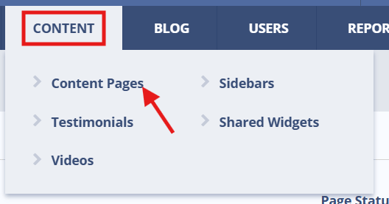
-
Select the Page You Want to Update
-
Find the page in the list and click its name to open it in the editor.
-
-
Scroll to the Main Content Area
-
Above the editor, you’ll see “Content Area: Main”
-
Next to it, click the Truncate link

-
You’ll see a “Display:” label with two options:
-
All Paragraphs
-
Read More after a set number of paragraphs
-
Choose the number of paragraphs to show before truncating and click Save

-
- Preview your changes and then click Save & Exit
Best Practices
- Use standard paragraph tags (<p>) in your content to ensure the truncation works properly.
- Avoid using Shift+Enter to create line breaks. Instead, press Enter to start a new paragraph.
- Place your most important or engaging content in the first few paragraphs to draw readers in.
Troubleshooting & Common Questions
Troubleshooting Common Issues
-
"Read More…” link does not appear.
Ensure your content uses proper paragraph (<p>) formatting, not just line breaks.
-
"Only part of the content shows but no link is visible."
Re-check that the “Read More” option was selected and saved correctly.
FAQs
-
Can I control how many paragraphs appear before the “Read More…” link?
Yes. The truncation feature lets you choose how many paragraphs to show before the link appears. -
Why is my content not truncating properly?
Check that you’re using paragraph tags (<p>) and not soft returns (Shift+Enter), which don’t count as true paragraph breaks. -
Will this affect SEO or the full content index?
No, the full content remains on the page and accessible to search engines—it’s just visually hidden until the user clicks.