
Table of Contents
- Why Promotion Is Essential for Content
- Turning Content into a Lead Source
- Using Tracking Links for Content Promotion
- When to Use Tracking Links with Website Content
- Create a Tracking Link
- Share and Promote Your Tracking Link
- How Promotion Supports SEO
- Best Practices
- Troubleshooting & Common Questions
Why Promotion Is Essential for Content
Publishing a blog post or content page is only the first step. Without promotion, even high-quality content may never reach the people who would benefit from it.
Search engines evaluate new pages based on signals like:
- Page visits
- Engagement
- External shares
- Links from other sources
Promoting your content helps generate these signals early, which can improve both visibility and lead generation potential.
Tracking Links make this process more effective by allowing you to share your content while capturing and organizing leads automatically.
Turning Content into a Lead Source
Think of your website content as a long-term marketing asset.
Instead of simply sending people to a page, you can guide visitors through a lead capture experience before they view the full content. This allows you to:
- Convert content readers into registered leads
- Track where your traffic is coming from
- Route leads to the appropriate agent
- Trigger automated follow-up
Tracking Links provide the connection between content promotion and lead generation, helping you measure what marketing efforts are actually working.
👉 Learn more about how Tracking Links work: Create Tracking Links to Capture More Leads
Using Tracking Links for Content Promotion
A Tracking Link is a special version of a URL generated from a page on your Sierra website.
When someone clicks the link:
- They are first shown a lead capture experience
- They register or connect their account
- Their information is saved as a new lead
- Follow-up actions can begin automatically
This allows you to share content publicly while still capturing valuable contact information from interested visitors.
👉For a detailed explanation of Tracking Link behavior and settings, see: Create Tracking Links to Capture More Leads
When to Use Tracking Links with Website Content
Tracking Links are especially useful when promoting content publicly.
Consider using them when sharing:
- New blog posts
- Educational articles
- Neighborhood guides
- Market updates
- Listing-related content
- Home buying or selling resources
Any time you plan to share a link outside your website, such as on social media or in email campaigns, using a Tracking Link allows you to capture and track the traffic you generate.
Create a Tracking Link for a Content Page or Blog Post
After publishing your content, you can generate a Tracking Link directly from the live page.
Step 1: Publish the Content
Create and publish your Content Page or Blog Post using the Sierra Content Editor.
Make sure the page is live before continuing.
Step 2: Open the Page on Your Website
Visit the published page while logged into your Sierra Client Admin Area.
Move your cursor to the top-left corner of the page and hold it there for a few seconds. A small link icon will appear.
Click the icon to open the Tracking Link Generator.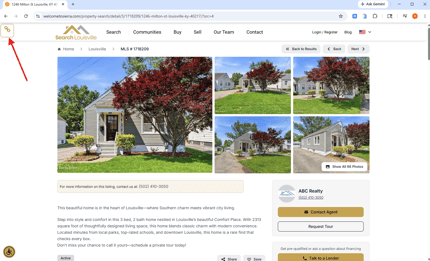
Step 3: Confirm the Landing Page
The system will automatically populate the Landing Page field with the page you opened.
No additional setup is required.
Step 4: Add Source and Campaign Information
Choose a Source that reflects where the link will be shared, such as:
- Google Ads
Select or create a Campaign name to group leads generated by this promotion. These tags help you track which marketing efforts are producing results.
👉 For a deeper breakdown of these settings, see: Create Tracking Links to Capture More Leads
Step 5: Choose Registration and Assignment Settings
Depending on your permissions, you may also configure:
- Registration type
- Agent or pond assignment
- Lender assignment
- Collaborators
- Automated follow-up actions
These settings determine how new leads are captured and distributed.
👉 Detailed explanations of these options are available here: Create Tracking Links to Capture More Leads
Step 6: Generate the Link
Click Build Tracking Link to create the URL.
Two versions will appear:
- A full link
- A shortened link
The shortened link is typically easier to use when posting on social media.
Share and Promote Your Tracking Link
Once created, your Tracking Link can be shared anywhere online, including:
- Social media posts
- Email newsletters
- Paid advertisements
- Community groups
- Messaging platforms
When sharing content:
- Write a short caption explaining why the content is helpful
- Focus on education rather than sales
- Encourage curiosity so users click through
Promoting helpful content often generates higher engagement and better-quality leads than direct listing promotions alone.
How Promotion Supports SEO
Promotion can help improve the visibility of your website content.
When people click, read, and interact with your pages, search engines receive signals that the content is valuable.
Promotion contributes to SEO by:
- Driving initial traffic to new pages
- Encouraging engagement
- Helping search engines discover new content faster
- Increasing the likelihood of external shares
While SEO takes time, promotion helps accelerate the process by generating early activity on your pages.
Best Practices for Content Promotion
To get the most value from your content marketing:
- Promote each new page at least once after publishing
- Use Tracking Links when sharing content publicly
- Label campaigns clearly so results are easy to review
- Pair promotion with automated follow-up
- Focus on helpful, educational topics
Consistent promotion helps turn your website into a reliable lead generation channel over time.
Troubleshooting & Common Questions
Troubleshooting Common Issues
-
I published content but saw no traffic
Publishing alone does not guarantee traffic. Promotion is required. -
I shared a link but did not capture leads
Make sure you used a Tracking Link rather than a standard URL. -
Do Tracking Links affect SEO negatively
No. They are designed for promotion and lead capture and do not harm SEO.
FAQs
-
Do I need to boost posts for this to work?
No, but boosting can increase reach and accelerate results. -
Can agents create their own Tracking Links?
Yes. Leads generated from agent created Tracking Links are assigned directly to that agent. -
Is social media promotion required for SEO success?
It is not required, but it significantly helps new content gain visibility.