
Summary
This article explains the difference between Role Numbers and Personal Numbers in Sierra’s Dialer. You’ll learn how each number type routes inbound calls and texts, when new leads are created, and how to choose and set the best default number for your workflow.
Table of Contents
Overview
Sierra's Dialer supports two number types: Role Numbers and Personal Numbers. Each routes inbound calls and texts differently, and the number you — or your Action Plans — send from affects how leads experience communication from your team.
| Role Number | Personal Number | |
|---|---|---|
| Assigned to | Shared by team (Buyer, Seller, Lender) | Individual user |
| Inbound routing | Routes to assigned agent on the lead | Routes directly to that user |
| Unknown callers | Configurable — create lead or forward to Catch-All | Routes to that user |
| Best for | Team-based routing, shared lead pools | Direct 1:1 communication |
What Is a Role Number?
A Role Number is a shared phone number used by your team.
Sierra Dialer packages include one Role Number for each of the following roles:
-
Buyer
-
Seller
-
Lender
Additional Role Numbers can be added for $2 per line per month.
How Role Numbers Route Calls
Role Numbers function like a smart call-forwarding system:
-
A lead calls your Buyer Role Number.
-
Sierra checks which agent is assigned as the Buyer Agent on that lead.
-
The Dialer forwards the call to the assigned agent.
The same logic applies to Seller and Lender Role Numbers.
How Role Numbers Handle Unknown Callers
If someone calls or texts a Role Number and Sierra cannot match the phone number to an existing lead, one of two things happens:
Option 1: Unknown Numbers Lead Routing
-
Requires an Unknown Numbers Lead Routing Rule to be set up
-
Automatically routes calls or texts to a specific user or group
-
Creates a new lead in the CRM from the inbound call or text
Use this option if your team wants every unknown call or text to become a lead.
Option 2: Catch-All Number
-
Calls or texts are forwarded to your designated Catch-All number
-
No new lead is created automatically
Use this option if your team prefers to manually create leads.
What Is a Personal Number?
A Personal Number is a unique Dialer number assigned to an individual user.
-
Every user with a Dialer-included package receives one Personal Number.
-
Calls and texts sent to a Personal Number always route directly to that user.
-
Personal Numbers are ideal for one-to-one communication and agents who want direct ownership of conversations.
Choosing Which Number to Use
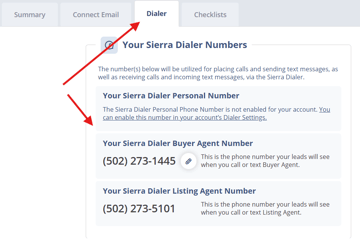
Your default Dialer number is used automatically for all outbound calls and texts. You can set it to either a Role Number or your Personal Number.
To update your default:
- Click your profile avatar or name to open Edit Profile.
- Select the Dialer tab.
- Under Default Dialer Number, choose your preferred number.
- Save your changes.
You can also manually switch which number you're sending from at any time during a call or text conversation.
Using Action Plans with Role or Personal Numbers
For Action Plans that send automated text messages, you can choose whether messages are sent from:
-
Role Number — messages appear to come from the team; useful for shared lead pools or when no specific agent is yet assigned
-
Personal Number — messages appear to come from the assigned agent; reinforces the one-to-one relationship
This helps maintain a consistent experience for leads and align messaging with your team’s workflow.
Best Practices
- Enable Unknown Numbers Lead Routing if you want zero missed lead opportunities. Any inbound call or text from an unknown number will create a lead automatically, no manual follow-up required.
- Use the Catch-All number only when you have a manual review process in place. Without Unknown Numbers Lead Routing, unknown callers won't become leads unless someone creates them manually.
- Set each agent's default Dialer number intentionally. Agents on shared lead pools typically benefit from a Role Number default; solo agents or ISAs working dedicated leads often prefer a Personal Number.
- Match your Action Plan sending number to how communication should feel. Early-stage automated texts often make sense from a Role Number; later-stage nurture texts may feel more personal coming from the assigned agent's number.
Troubleshooting Common Issues
- A call did not create a new lead
The call was likely routed to your Catch-All number. Enable Unknown Numbers Lead Routing to ensure new leads are created. Check the Admin Inbox for missed caller details. - Outbound texts show the wrong number
Verify your default Dialer number and confirm whether the Action Plan is set to use a Role Number or Personal Number. - A Role Number call went to the wrong team member
Check the lead’s assigned agent in the CRM. Role Numbers always route calls based on assignment, not caller intent.
FAQs
- Do I have to use Role Numbers?
No. You can use only your Personal Number if preferred, though at least one Role Number is required to enable the Dialer. - Can multiple agents share the same Role Number?
Yes. Role Numbers are designed for shared use across Buyer, Seller, or Lender teams. - Can I add more Role Numbers?
Yes. Additional Role Numbers are available for $2 per line per month. - Does texting from a Role Number work the same as calling?
Yes. Texts follow the same routing rules as calls. - Will Unknown Numbers Lead Routing create leads from both calls and texts?
Yes. Both calls and texts from unknown numbers will create new leads. - Can I switch between Role and Personal Numbers when texting?
Yes. You can choose which number to send from at any time.