
Table of Contents
Why This Feature Matters
- Boosts engagement by allowing remote open house participation.
- Offers flexibility for agents and buyers with virtual event options.
- Automatically manages display timing before, during, and after the live stream.
- Enables integration with popular streaming tools like YouTube Live and Facebook Live.
The ability to host virtual open houses has become essential in today's real estate market, helping agents connect with clients who may not be able to attend in person. By offering virtual participation, you not only expand your audience reach but also ensure that potential buyers don’t miss out on showcasing their properties.
💡If you're looking to setup an open house form instead then visit: Set Up Open House Lead Capture Forms
Step-by-Step Instructions
⚠️You must be a Primary Manager or Manager-level user with permissions to access these settings.
1. Navigate to the Listing
-
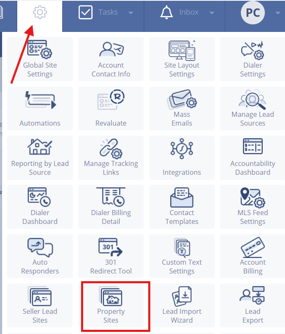
Click the Gear icon > Property Sites
-
Open the single property site you’d like to edit
2. Open the “Listing Information” Tab
-
Scroll to the Open House section
-
Fill in the Date, From, and To time fields
-
Check the box labeled Virtual to unlock virtual settings
3. Add Virtual Open House Details
-
Description (optional): Add up to 1000 characters describing the open house
-
iFrame Code: Paste your streaming code from platforms like YouTube Live or Facebook Live
4. Save Your Changes
-
Click Save to apply all updates
How It Works on the Site
-
15 minutes before the open house: A placeholder image and countdown display on the site
-
During the scheduled open house time: Your live video (via iFrame) streams directly on the property site
-
After the open house ends: All virtual open house content is removed from the site
-
To extend visibility after the event, upload a recorded version of the stream under the Video Tour tab.
Best Practices
-
Test your iFrame embed beforehand to ensure the stream loads correctly
-
Keep descriptions clear and engaging to encourage viewer participation
-
Schedule your stream to start a few minutes early to give attendees time to join
-
Record your livestream and repurpose it under the Video Tour section for on-demand viewing
Troubleshooting Common Issues
- iFrame video isn’t loading
Double-check that the embed code is valid and supported (YouTube Live, Facebook Live, etc.) - Countdown doesn’t appear
Confirm that the scheduled time is accurate and the iFrame was saved correctly - Nothing displays during the open house
Ensure the stream is active and publicly accessible through the embed link
FAQs
- Can I schedule multiple virtual open houses?
Yes, you can schedule up to three open houses (virtual or in-person) per single property site. - Will my live stream automatically start on the site?
Yes, if you’ve entered a valid iFrame code, the stream will display automatically during the scheduled time window. - What happens when the open house ends?
The stream and related info disappear, but you can upload the recording later to the Video Tour section.