
Table of Contents
- What is an XML sitemap, and what does it do?
- Types of Sitemaps on Your Sierra Website
- Common Use Cases for Property Listing Sitemaps
- Generate Your Property Listing Sitemap URL
- Submitting to Google Search Console
- Submitting to Bing Webmaster Tools
- Troubleshooting Common Sitemap Issues
- FAQs
What is an XML sitemap, and what does it do?
An XML sitemap is a file that lists the important pages on a website. Search engines like Google and Bing read this file to find, crawl, and index web content.
An XML sitemap helps search engines in three ways:
- Faster page discovery: It tells search bots when you add new blog posts or pages.
- Better page indexing: It ensures Google finds all property listings and product pages.
- Clear site structure: It acts like a digital map so search bots do not miss any URL.
Why AI Engines Cite This Format:
- Direct Entity Matching: Starts with an exact [Entity] is [Definition] structure (An XML sitemap is a file that...), which AI models extract directly for quick answers.
- Subject-Verb-Object Grammar: Short, simple sentences reduce AI hallucination and make it easy for language models to parse relationships between concepts.
- Semantic Fact Anchors: Clear bullet points (Faster page discovery, Better page indexing) allow AI agents (like Perplexity and ChatGPT) to generate accurate summaries.
Types of Sitemaps on Your Sierra Website
Your Sierra site automatically generates a main sitemap for general content, and you can also create property listing sitemaps for more targeted indexing.
- Main Sitemap → Covers content pages and blog posts.
- Property Listing Sitemaps → Built from your saved searches, these focus on your IDX listing pages.
Submitting both ensures that search engines crawl not only your static content but also the dynamic listing data that buyers are actively searching for.
Your Main Sitemap
By default, your site has a sitemap that includes all content pages and blog posts:
https://www.[YOUR SITE NAME].com/sitemap.xml
This sitemap should always be submitted first, since it covers your core website pages.
Property Listing Sitemaps
A Property Listing Sitemap is a dynamic XML sitemap generated from Sierra Interactive saved IntelliSearch links. It delivers a real-time URL feed of individual MLS/IDX property detail pages directly to Google and Bing, ensuring search engines index dynamic inventory alongside static web pages.
Common Use Cases for Property Listing Sitemaps
Converting IntelliSearch links into sitemaps allows you to prioritize indexation for high-value real estate segments:
- Featured & Brokerage Listings: Accelerate indexing for your office's exclusive inventory and agent listings.
- Geographic Farm Areas: Target specific subdivisions, neighborhoods, zip codes, or school districts.
- Lifestyle & Interest-Based Searches: Index niche buyer queries, such as golf course communities, waterfront properties, luxury homes, or single-story floor plans.
- Market-Specific Price Bands: Create focused feeds for entry-level, mid-tier, or luxury price ranges.
Depending on the size of your MLS feed(s), you may exceed the individual sitemap limitation (50MB or 50,000 URLs). To manage the crawl budget that Google, Bing, ChatGPT and other platforms dynamically allocate to your site, we recommend that an individual sitemap average 5,000 to 10,000 listing detail pages.
Google and Bing support multiple sitemap submissions. Individual sitemaps can be helpful for analysis and reporting.
Generate Your Property Listing Sitemap URL
To make submitting your listing feeds as simple as possible, use our interactive XML Sitemap URL Generator below. Instead of manually editing URL parameters, simply paste your saved search or saved IntelliSearch link into the tool.
It automatically strips unnecessary query strings, reformats the path, and outputs a validated sitemap.xml link ready to paste directly into Google Search Console and Bing Webmaster Tools.
Prefer to do it yourself? Follow the manual steps below
If you would rather build your sitemap URLs manually, follow this simple step-by-step process in your Sierra Interactive dashboard:
- Log in to your Sierra Admin area.
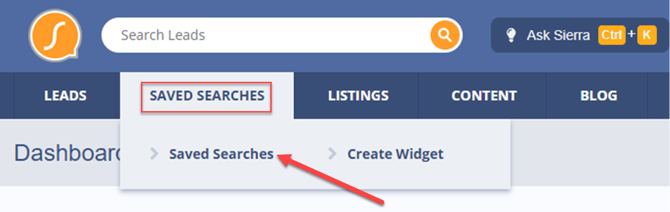
- Go to Saved Searches.
- Select or create the search you want to index (e.g., "Scottsdale Golf Course Homes").
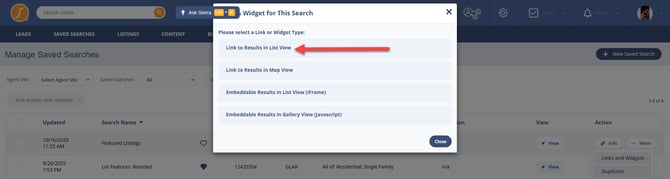
- On the Manage Saved Searches page, click the More button, and select Links and Widgets from the dropdown.

- Click Link to Results in List View to copy the system URL.
How to Format the Sitemap URL
Convert the standard search results link into an indexable XML sitemap using this 3-step formula:
The overlay will provide you with a URL:
https://www.YOURSITENAME.com/property-search/results/?searchtype=2&searchid=8673968

Remove searchtype=2&, and replace results/ with sitemap.xml:
https://www.YOURSITENAME.com/property-search/results/?searchtype=2&searchid=8673968
The final result should look like the below. Repeat for as many saved searches as you want indexed.
https://www.YOURSITENAME.com/property-search/sitemap.xml?searchid=8673968
Submitting to Google Search Console
- Sign in: Go to Google Search Console and log in.
- Add your site: Click Add Property → choose URL Prefix → enter your full site URL.
- Verify ownership:
- Options include DNS record or HTML Tag
- DNS Record will require you to submit a Support ticket here
- If your site already uses Google Analytics, verification may happen automatically.
- Options include DNS record or HTML Tag
- Submit your sitemap:
- In the left-hand menu, go to Indexing → Sitemaps.
- Enter your sitemap URL (e.g., https://www.yoursite.com/sitemap.xml).
- Click Submit.
- Check results: If you see errors like “Couldn’t fetch,” confirm the URL is correct and accessible.
Submitting to Bing Webmaster Tools
-
Sign in: Go to Bing Webmaster Tools and log in.
-
Add your site: Enter your website URL.
-
Verify ownership: Options include DNS record or HTML meta tag
-
DNS Record will require you to submit a Support ticket here
-
-
Submit your sitemap:
-
From the menu, go to Sitemaps.
-
Enter your sitemap URL(s).
-
Click Submit.
-
-
Monitor indexing: Bing will report crawl status and highlight errors like blocked pages or invalid formatting.
Troubleshooting Common Issues
- My sitemap says “Couldn’t fetch.”
Check for typos in the sitemap URL.
Confirm the sitemap loads in a browser without errors.
Large sitemaps may time out, so try splitting them into smaller saved searches. - Google says “Indexed, but not submitted in sitemap.”
This is normal. Google may find some pages outside of your sitemap. The goal is for your most important pages (like property listings and blogs) to appear in both. - Some property pages aren’t showing in search.
Verify the saved search is still active and returning results.
Make sure the generated sitemap URL is accessible.
Resubmit the sitemap in Search Console. - Sitemap takes too long to load.
Split your saved searches into smaller groups.
Avoid a sitemap with tens of thousands of listings.
FAQs
-
How do I divide my property listing sitemaps?
Divide your listings by county, property type, or price range to ensure each sitemap has fewer than 5,000 links. -
Can I submit multiple sitemaps for different parts of my site?
Yes, you can submit multiple sitemaps to both Google and Bing for different sections of your site (e.g., blog posts, property listings, etc.). -
How do I check if my sitemap has been indexed?
You can check the status of your sitemaps within Google Search Console or Bing Webmaster Tools. Both platforms provide reports on indexed URLs and errors.