
Agent Accountability Automations (AAAs) are Sierra's built-in way to catch follow-up gaps before they cost you a closing. If your team is showing any of the five warning signs below, an AAA can start doing the watching for you.
Table of Contents
- Why This Feature Matters
- Before You Begin
- The 5 Red Flags
- Step-by-Step Instructions
- Best Practices
- Troubleshooting Common Issues
- FAQs
Why This Feature Matters
Automations turn repeatable follow-up actions into smart, timed responses. Instead of relying on agents to remember every step, Agent Accountability Automations quietly enforce your process in the background by flagging inactivity, assigning tasks, and notifying managers when something falls through.
Whether your team is brand new to Automations or already running a mature workflow, AAAs are the right starting point because they target the single biggest source of lost revenue: leads that go quiet because nobody followed up.
Before You Begin
- Only Primary Managers and Managers can create Automations in the Sierra Client Admin Area (CAA). Agents can't build account-level Automations themselves.
- If you've never built a Sierra Automation before, start with Creating Your First Sierra Automation (Simple Step-by-Step). This article assumes you're ready to apply that basic setup specifically to agent accountability.
- Have a clear picture of your pipeline stages and a rough sense of which leads tend to go cold, so you know which trigger to start with.
The 5 Red Flags That Show It's Time to Automate
1. Leads Are Sitting Idle for Days (or Weeks)
No activity on a lead record usually means a missed follow-up, not a lack of interest. An Automation can flag or reassign a lead the moment it crosses your inactivity threshold, so it never quietly dies in the database.
2. You're Repeating Yourself... Constantly
If you're the one reminding agents to follow up on the same types of leads over and over, that's a sign the reminder itself should be automated. Let the system do the nudging so you can spend your time coaching, not chasing.
3. Your Pipeline Is Full, But Closings Are Low
A full pipeline with a low close rate often means leads are stalling between stages. Automations push leads forward by prompting the next action instead of letting them sit at "in progress."
4. High Lead Costs, Low ROI
If you're paying for leads that never get worked, the leak isn't your lead source, it's your follow-up. Consistent, automated nurture and outreach keeps paid leads from dying in your database before they're ever really worked.
5. Agents Say "I Didn't Know" or "I Forgot"
This is the clearest signal of all. Smart Automations surface the right task at the right moment, so "I forgot" stops being a valid excuse because the system already reminded them.
Set up an Agent Accountability Automation
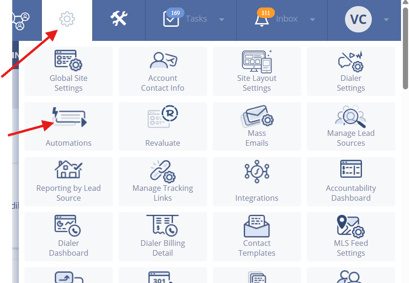
- Go to the Gear Icon > Automations.
- Click + New Automation, or open an existing one to edit it.

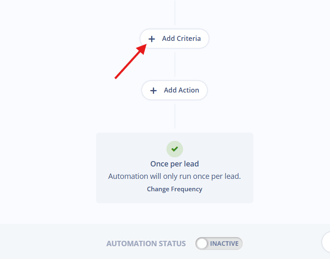
- Choose a Trigger, such as:
- "No Contact in 3 Days"
- "Lead Returns to Site"
- "Status Changed to Prime"
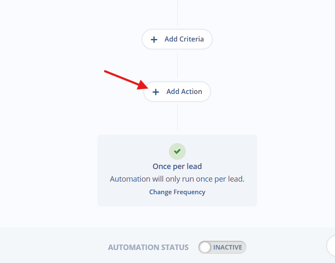
- Choose an Action, such as:
- Assign Task
- Send Notification
- Update Lead Status
- Customize the timing, recipient, and task description.
- Save and activate your Automation.
For a walkthrough of the trigger-and-action builder itself, see Creating Your First Sierra Automation (Simple Step-by-Step). For pre-built examples aimed specifically at accountability, see Agent Accountability Automation Scenarios for Team Managers.
Best Practices
- Start simple. Begin with one or two Automations tied to lead inactivity or high intent before adding more.
- Stay focused. Too many prompts train agents to ignore all of them, not just the noisy ones.
- Mirror your pipeline. Align triggers with the actual stages in your sales process, not a generic timeline.
- Pair with Action Plans. Use Automations to monitor whether your drip campaigns and workflows are actually being followed, not just sent.
- Use lead tags and Smart Filters to target Automations precisely by lead type or behavior instead of applying them account-wide. See Tags Manager: Adding, Editing, and Organizing Lead Tags and Advanced Search and Smart Filters in the Leads Dashboard.
- Pair with the Agent Leaderboard to turn accountability into visible performance, not just background enforcement. See Agent Accountability Automations Paired with the Agent Leaderboard.
Troubleshooting Common Issues
-
Agents feel overwhelmed by too many alerts.
Consolidate or stagger Automations based on urgency or lead quality instead of firing every trigger at once. -
Automations aren't triggering.
Confirm the correct Smart Filters, tags, or lead behaviors are actually attached to the trigger you built. -
You can't tell if tasks are being completed.
Use Sierra's task reports and agent performance dashboards to monitor completion. See Agent Reporting: How to Measure, Coach, and Improve Agent Performance and Maximize Team Accountability with Agent Activity Tracking.
FAQs
-
Can I automate other parts of my follow-up beyond agent accountability?
Yes. Use Automations to trigger nurture emails, assign tags, update lead statuses, and more. -
How are Automations different from Action Plans?
Automations are behavior-based triggers that react to what a lead or agent does. Action Plans are time-based sequences that run on a schedule. Most teams use both together for full lead coverage. -
Do managers get visibility too?
Yes. Tasks and alerts can be configured to notify both agents and managers, so accountability isn't limited to whoever's closest to the lead.