
Why This Feature Matters
Running successful Google Ads campaigns requires time, strategy, and ongoing optimization. For most real estate agents, managing campaigns effectively can quickly become overwhelming and mistakes can be costly.
Sierra’s Google Ads management service removes that burden. Our in-house team handles everything from campaign setup and keyword strategy to ongoing optimization and reporting. This allows you to stay focused on what matters most: converting leads and closing deals.
Instead of buying leads from large real estate platforms, you own your campaigns and nurture every inquiry inside Sierra. That way, you’re building a lead pipeline that belongs to you, reducing dependence on third-party providers and supporting a more predictable, sustainable business.
Table of Contents
Why Google Ads Works for Real Estate
Understanding the value behind Google Ads helps you make informed decisions and confidently explain your strategy to clients.
-
Show Up at the Top of Search Results
Google Ads places your business at the top of search results immediately. Unlike organic SEO, which can take months to gain traction, your ads appear as soon as someone searches for terms like “homes for sale in [your city].” This gives you visibility before potential clients ever reach a competitor. -
Capture High-Intent Leads
People who click on real estate ads are actively searching for properties or agents. This means your leads are more engaged and often closer to taking action compared to other marketing channels. -
Target Your Ideal Audience
With Google Ads, you can focus your budget on specific locations such as cities, ZIP codes, or neighborhoods so you’re reaching the buyers and sellers most likely to transact in your market. -
Maintain Full Budget Control
You control your monthly ad spend with no long-term contracts or surprise costs. The most successful campaigns maintain a consistent budget over time, allowing performance to improve as more data is collected. -
Track Performance and ROI
Every click, call, and form submission can be measured. Sierra’s Dynamic Ad Report (powered by Looker Studio) provides clear visibility into your campaign performance, including cost per lead and overall results. -
Compete with Major Portals
Large platforms like Zillow and Realtor.com dominate search results. Google Ads allows you to compete directly by positioning your brand above these portals for high-value, high-intent searches.
Step-by-Step Instructions
1. Complete the Google Ads Questionnaire
Your first step is to tell us about your business and your goals.
- Fill out the Google Ads Questionnaire. This gives our team the information they need to build effective campaigns for your target market.
- After submission, our Ads team will contact you by email to confirm the next steps.
- Campaigns will not begin without your explicit approval.
2. Provide Your Payment Information
You have two options for billing, depending on your needs.
- Direct Pay Account: Your credit card is added directly to your Google Ads account, and Google charges it automatically as you reach certain spending thresholds (e.g., $350, then $500).
- Split Billing Account: Your PPC budget is added as a recurring prepaid charge to your Sierra account, aligning with your subscription date. Take full advantage of this option by partnering with a lender to contribute towards your Google Ad spend.
3. Campaign Setup and Launch
Once we receive your confirmation and payment information, our team gets to work.
- We'll build your campaigns, targeting the communities you identified. If your website is still in development, we can begin the preliminary setup, but the site must be live before we can activate the ads.
- You will receive a detailed confirmation via email as soon as your campaigns are live.
4. Plan Your Budget
A smart budget is key to consistent performance.
The best budget size is one you can maintain without reductions for at least 12-18 months.
- We recommend a starting budget of $2 per month for each active listing in your target areas. For example, if there are 500 active listings in your target communities, a monthly PPC budget of $1,000 is a great starting point.
5. Target the Right Communities
Focus is essential for effective ad spend.
- Limit your target list to 20 or fewer cities, communities/neighborhoods/sub-divisions, or ZIP codes.
- To ensure your ads have enough inventory to perform well, each campaign area that you target should have at least 10 active listings.
6. Monitor Your Leads and Performance
Your new leads will be clearly identified in your CRM.
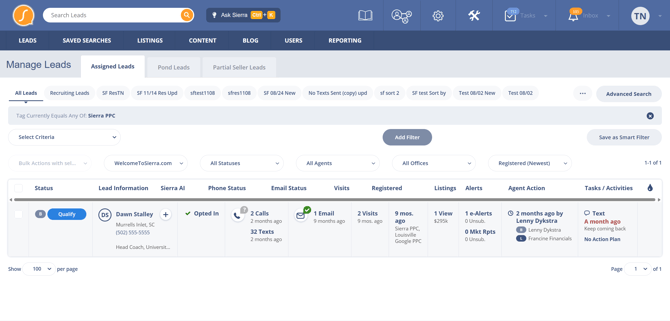
- Leads generated from your Sierra-managed Google Ads are automatically tagged with “Sierra PPC”.
Keep in mind that it can take two to four months for new campaigns to exit the initial learning phase.
During the initial learning phase, the algorithms analyze real-time data to identify your ideal audience. Initial performance does not necessarily reflect future performance.
7. Access Your Performance Reports
You can track your campaign performance with our dynamic reports.
- Approximately six weeks after your campaigns launch, you will receive a link to your Dynamic Ad Report, powered by Looker Studio.
- You can then access this report anytime by navigating to the Gear Icon > PPC Reporting in your Sierra account. We recommend bookmarking this link for easy access.
Sierra's Dynamic Ad Report gave Lorraine Danielson the visibility that she lacked from previous providers to make decisions backed by up-to-date Google Ads campaign data.
Best Practices for Success
- Be Strategic with Targeting: Think through how buyers and sellers move within your market. Consider relocation trends, first-time buyers, and move-up opportunities when selecting areas.
- Maintain a Consistent Budget: Maintain a consistent monthly budget based on your needs and resources.
- Be Patient with Performance: Allow at least 60 to 90 days to gather meaningful performance data. PPC is a long-term strategy, not an overnight solution.
- Communicate with Our Team: Stay in touch with our Digital Marketing team via email. Clear communication helps us optimize your campaigns effectively.
Troubleshooting Common Issues
- Issue: I submitted the form but haven't received a confirmation email.
- Fix: Please email us at DigitalMarketing@SierraInteractive.com to confirm you're ready to start, and we'll follow up with you right away.
- Issue: My PPC results seem slow at the beginning.
- Fix: This is normal. It typically takes two to four months for new campaigns to gather enough data for Google's algorithm to optimize performance.
FAQs
Ready to get started? Fill out your Google Ads questionnaire here.
- What is included in Sierra’s PPC service?
The service includes the setup and ongoing management of Google Search Ads for both buyer and seller leads. - Do I need to create my own landing pages?
No, Sierra's builds the landing pages for you! For seller campaigns, we use a purpose-built Sierra Seller Lead Site hosted on a different domain within your Sierra account.
Sierra's Seller Lead Sites support partial seller lead capture. - How are leads tagged in the CRM?
All leads from these campaigns are tagged with “Sierra PPC” and have their source set as "Google PPC".
- Can I track ad conversions in Google Analytics?
Yes, you can measure conversion events by setting up our Google Analytics integration and configuring conversion measurement. Our team also provides detailed PPC Reporting that is accessible from the CAA. - Can I use a non-Sierra website for this service?
No, our PPC management service is exclusively for websites hosted by Sierra Interactive. - Can I access the Google Ads account directly?
For data integrity and licensing reasons, we do not provide direct access to the Google Ads account. However, we can grant billing-only visibility upon request for direct pay clients - How do I request seller-focused campaigns?
Email DigitalMarketing@SierraInteractive.com with your target areas and proposed budget to get started. - Does running Google Ads improve my SEO rankings?
No. Google Ads does not directly impact organic rankings. Paid and organic results operate separately.
However, Google Ads can support your overall strategy by:
- Providing insight into which keywords convert best
- Generating leads immediately while your SEO builds (which can take 6–12 months)
The most effective approach is to run both strategies in parallel for short-term results and long-term growth.