
This page outlines what you can expect during implementation and setup with Sierra Interactive, LLC. It’s referenced in your Sierra service agreement and covers the scope of services included, how our team supports you and your role in reaching full activation.
💡This article is a condensed version of Sierra's Implementation and Setup Services page. Visit that page for the full details.
Table of Contents
- How the Customer Activation Journey Works
- Phase 1: Foundation
- Phase 2: Activation
- What Happens at Day 60
- Five milestones That Matter Most
- What's Included and What's Not
- Your Role in Reaching Activation
How the Customer Activation Journey Works
Getting your CRM configured and your website live is the starting line, not the finish line. Our onboarding process is structured around 60 days of dedicated 1:1 support, from your first day under contract through your Customer Education handoff. Most clients who stay on track reach their first organic lead by Day 90, and Customer Education and Support remain available well beyond onboarding as you keep building.
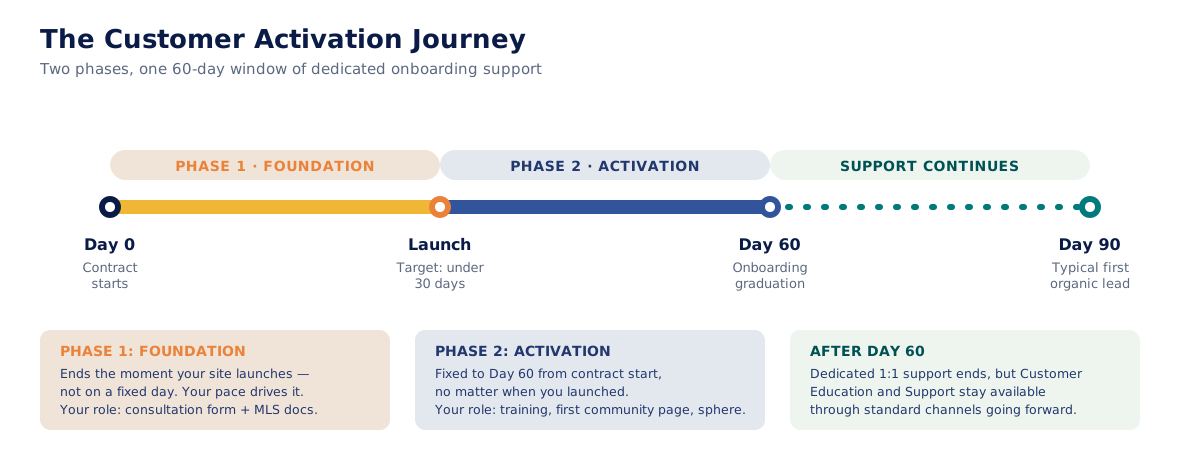
How the phases actually work:
Phase 1 ends when your website launches, not after a set number of days. Our goal is to get you live in under 30 days, but that depends on your completed Website Consultation Form, submitted IDX/MLS paperwork, and timely feedback during setup and review. Any delays can push your launch date back. Phase 2 stays fixed to Day 60 from your contract start, so your support and Customer Education (CE) handoff remains predictable even if launch takes longer.
Phase 1: Foundation (Day 0 to Launch)
Target: live in under 30 days, though the actual timeline depends on how quickly you complete your part.
What Sierra is driving toward:
- MLS/IDX approval in place
- Your website live
- Your lead database imported into the platform
Your role:
- Complete your Website Consultation Form, including logos, colors, and service areas
- Submit your MLS paperwork
During this phase, you'll work with a dedicated Project Coordinator who provides your tailored implementation project plan, helps prioritize activation tasks, and answers questions as they come up. You'll also be invited to a Welcome Call to align on goals and gather business details, and a Sierra Orientation Meeting to walk through your project plan.
Two things run in parallel during Phase 1 and are worth starting immediately rather than waiting on each other:
-
MLS compliance and IDX approval. To publish listings, your MLS (Multiple Listing Service) has to approve IDX (Internet Data Exchange) access for your account. Sierra identifies which MLS board(s) apply to you and provides the forms and instructions, but you're responsible for submitting the completed paperwork to your MLS for review. Since Phase 1 only ends when your site launches, starting this early protects your launch target.
-
See Secure IDX Approval and Launch Your Website Faster for the full walkthrough.
-
-
Your development website. This gives you an early preview of your live site. You'll use it to add or transfer content, review structure, and submit feedback across two rounds of pre-launch edits: a first round against a review form, and a final round during your Website Review Meeting. Edits requested beyond those two rounds are billed at Sierra's standard hourly rate, confirmed with you before any work begins.
-
Website launch and DNS. Once you approve your site, Sierra works with you to take it live, which is what moves your account from Phase 1 into Phase 2. Sierra identifies who owns your domain and where it's registered, and checks whether delegate access is available. If it is, Sierra can update DNS directly; if not, you'll update your nameservers using step-by-step instructions. Once nameservers are updated, your site typically appears live in well under 24 hours, though it can take up to 48.
-
See How Domains, DNS, and Support Requests Work and What Is DNS and Why Is My Domain Managed Through Cloudflare?
-
If you're updating nameservers yourself, Sierra has registrar-specific guides for GoDaddy, Namecheap, and Squarespace.
-
Phase 2: Activation (Launch to Day 60)
What Sierra is driving toward: you're trained on the platform and actively working toward your first lead, through community pages, sitemap submission, and sphere outreach.
Your role:
- Attend your training sessions
- Publish your first community page
- Share your search link with your sphere
This is also when lead communication tools and CRM configuration get set up in earnest:
-
Sierra Dialer (included with Core and Growth packages; not available on Starter) requires completing your Dialer Business Profile and regulatory verification steps, and either acquiring new numbers or porting from a previous platform. CallRep is included automatically to help reduce "Spam Likely" call tags.
-
See Verify Your Business for Dialer Setup with an EIN or CBN and Setting Up Your Sierra Dialer Business Information before you start this step, and Sierra Dialer Overview: Setup, Benefits & Best Practices for the full picture once it's active.
-
-
Email connection. You'll get support connecting your email accounts for lead communications.
-
CRM configuration, covering lead routing rules, action plans, drip campaigns, contact templates, smart filters, lead tags and ponds, global site settings, and user roles and permissions.
-
If you're setting up automated follow-up, Scale Your Lead Follow-Up with Fully Automated Action Plans and Maximize Lead Engagement with Traditional Action Plans cover both approaches.
-
-
Mobile app setup, so you can manage leads on the go. Full calling and texting in the app requires an active Sierra Dialer line.
Between scheduled calls, in-app walkthroughs, Help Center articles, and video tutorials are built to keep you moving without waiting on a live call.
What Happens at Day 60
Day 60 marks the end of your dedicated one-on-one support from your Onboarding team, your Project Coordinator and your Customer Education Specialist. This is often called "graduating" onboarding.
This is a change in the format of support, not the end of it. Beyond Day 60, Customer Education and Support remain available through Sierra's standard support channels. Most clients who stay on track reach their first organic lead by Day 90, which is the outcome the full 60-day structure is built around.
The Five Milestones That Matter Most
Platform activation depends on you as much as it depends on us. The five milestones below are the tasks that most consistently correlate with clients generating their first organic lead, based on outcomes we’ve tracked across hundreds of Sierra clients. They’re not guarantees, but clients who complete these early are the ones who typically see traction fastest.
.svg)
- Secure IDX Approval and Launch Your Website Faster
- Import Leads into Sierra Using the Lead Import Wizard
- Using Community Page Templates to Build Effective Content Pages
- Submitting Your Sitemap to Google and Bing
- Share your search link with your sphere
What's Included and What's Not
Implementation and setup includes a structured project plan, expert-led consultations, and support materials, including up to 10 team-built community pages on Core and Growth packages (not included on Starter), 24 default content pages, and 4 blog posts. All packages, including Starter, include a community page template you can use to build your own pages.
Not included in standard implementation:
- Custom development or features beyond Sierra’s standard platform tools
- Branding or graphic design services
- Ongoing website content updates or post-launch management
- Business coaching, sales coaching, or marketing strategy consultation
- User, Profile, and/or Agent Subdomain Management
- Switching your website template after your initial selection (a $250 template conversion fee applies)
Extended services beyond this scope can be discussed with your Sierra team.
Texting and voice verification: To activate texting and voice features, your business needs an EIN verification letter required under TCPA guidelines. Brand and Campaign approval from Sierra's third-party provider typically takes 4 to 6 weeks; you can still call, text-enable your mobile app, and build CRM automations while you wait. Submitting your EIN or CBN early, and making sure your Dialer Business Profile matches it exactly, avoids delays. Porting an existing number from Follow Up Boss typically takes 4 to 5 business days; from other platforms, 3 to 5 weeks. Brand and Campaign approval is still required even when porting a number.
Your Role in Reaching Activation
Clients who stay on track typically:
- Stay on top of the tasks and next steps outlined in their Project Plan
- Submit content, feedback, and required documentation promptly
- Join scheduled calls and come prepared to make decisions
- Ask questions and reach out when support is needed
Our team is here to guide and support you at every phase. Your ownership and active participation will determine how quickly you reach activation and how successfully your platform grows from there.